Key Takeaways
- USPS Form 1583 is the authorization every virtual mailbox or private mailbox provider (a CMRA) must hold before it can receive your mail. Each adult files their own.
- The current edition is June 2024. Its items are numbered 1 to 14, and many guides online still describe the older layout.
- You need 2 current IDs: a government photo ID from the form’s list and a document showing your home address. A foreign passport counts; utility bills and bank statements aren’t on the list.
- USPS doesn’t require a notary. You can sign in front of the provider’s staff, in person or on live video, or in front of a notary commissioned in a US state or territory.
- You don’t mail the form to USPS. The provider uploads it to the USPS CMRA Customer Registration Database and certifies it every quarter.
- If your name, address or ID changes, you file a new Form 1583. There is no fixed renewal date, but an expired ID puts the record out of compliance.
What is USPS Form 1583?
USPS Form 1583, officially PS Form 1583, "Application for Delivery of Mail Through Agent", is the form that lets a private business receive your mail for you. USPS calls that business a Commercial Mail Receiving Agency, or CMRA. Virtual mailbox companies, private mailbox stores and office business centers are all CMRAs, and so are reshipping services (DMM 508.1.8.1).
Without a Form 1583 on file, the CMRA isn’t allowed to keep your mail. It has to hand it back to the Post Office the next business day, endorsed "Undeliverable, Commercial Mail Receiving Agency, No Authorization to Receive Mail for this Addressee" (DMM 508.1.8.4). That is why every virtual mailbox provider asks for the form before your address goes live.
Which version of Form 1583 is current?
The current edition is dated June 2024. The USPS forms catalog (Publication 223, June 2026 edition) still lists PS 1583 at 6/24 and PS 1583-A at 1/23 (source). Download it free from USPS at about.usps.com/forms/ps1583.pdf. Check the footer before you fill anything in: it should read "PS Form 1583, June 2024". Your provider may give you its own digital version, but it can’t change the form’s content, because USPS says altered forms are invalid (DMM 508.1.8.3).
Who needs to file Form 1583?
- Every adult who receives mail at the mailbox. For personal use, each adult files a separate form. Spouses each file their own (DMM 508.1.8.3).
- A business. One form for the business, signed by an officer who adds their title. Other people receiving mail there are listed on the form (form footnotes 13 and 14).
- Not minors. A parent or guardian lists a child’s name on their own form. The child’s ID isn’t required.
- The CMRA’s own owner or manager, who also files a 1583 for themselves.
Form 1583 vs Form 1583-A
They are easy to mix up. Form 1583 is filed by you, the mailbox customer, with the CMRA. Form 1583-A, "Application to Act as a Commercial Mail Receiving Agency", is filed by the CMRA’s owner or manager with the local postmaster to register the business itself. As a customer, you never fill in a 1583-A. It has its own section near the end of this guide.
Form 1583 ID requirements: the 2 documents USPS accepts
Form 1583 needs 2 forms of identification for you and for anyone you authorize to collect your mail. One must be a government-issued photo ID. The other must show the home address you write on the form (form footnote 9). Both must be current, not expired (DMM 508.1.8.3).
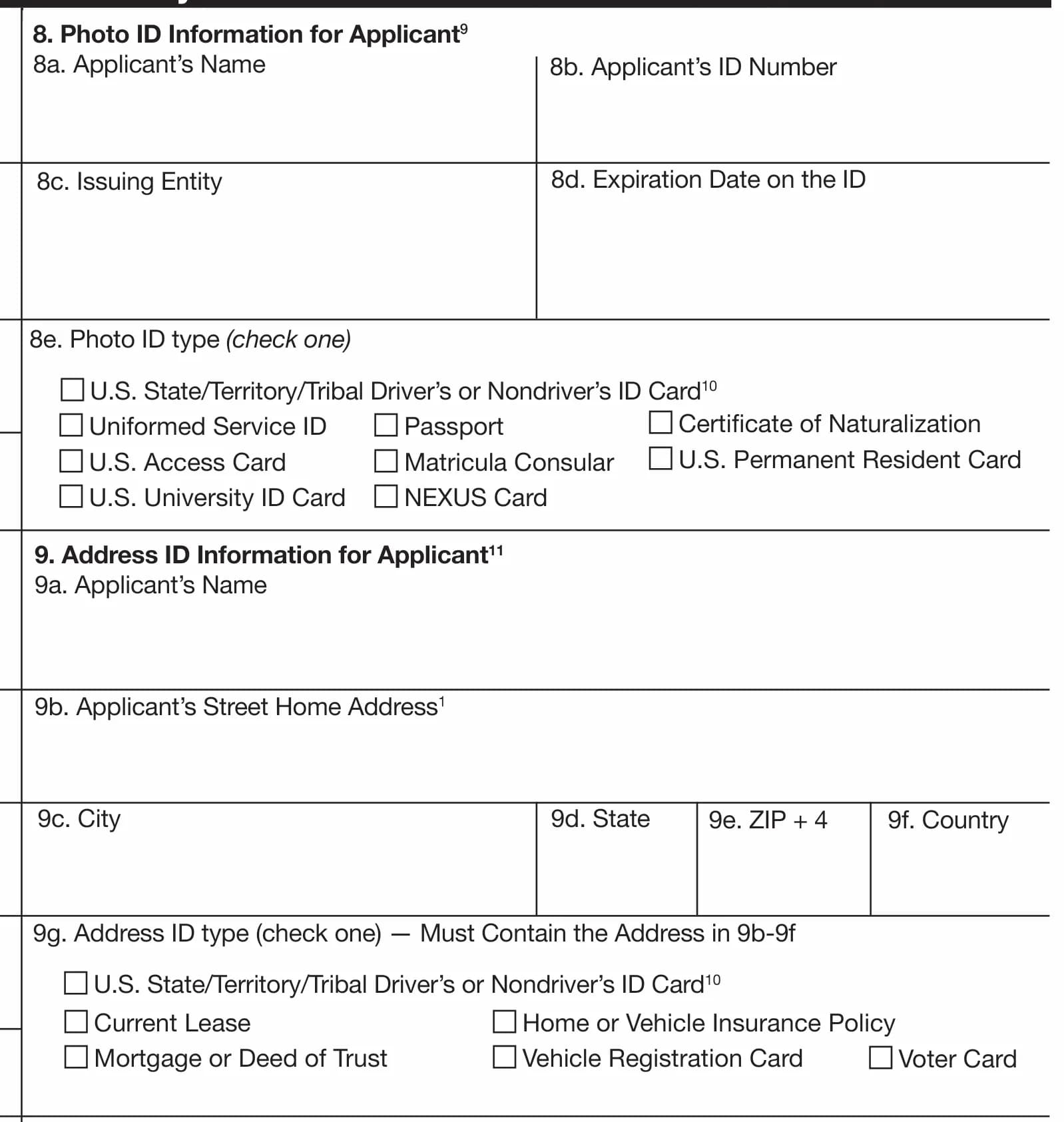
| ID 1: photo ID (item 8e) | ID 2: address ID (item 9g) |
|---|---|
| US state, territory or tribal driver’s license or nondriver ID card | US state, territory or tribal driver’s license or nondriver ID card |
| Passport (US or foreign) | Current lease |
| US Permanent Resident Card | Mortgage or deed of trust |
| Certificate of Naturalization | Home or vehicle insurance policy |
| Uniformed Service ID | Vehicle registration card |
| US Access Card | Voter card |
| US university ID card | |
| Matricula Consular (Mexico) | |
| NEXUS card (Canada) |
The passport line covers "a U.S. passport, U.S. passport card, or foreign passport" (DMM 608.10.3). The Domestic Mail Manual also allows a second photo ID or a Form I-94 arrival and departure record as the address document (DMM 608.10.4). Neither has a checkbox on the form, so ask your provider before you rely on one.
Can one driver’s license count as both IDs?
No. A driver’s license appears on both lists, but the form says it "may be used for only one of the IDs (either photo ID or address ID), not for both" (form footnote 10). Use your license for one and a lease, insurance policy or passport for the other.
IDs USPS won’t accept
- Social Security cards, birth certificates and credit cards, "and other similar items" (DMM 608.10.5).
- Utility bills and bank statements. Many people assume these work, but neither appears on the form or in the manual.
- Anything expired. The provider has to certify every quarter that no ID on file has expired.
- A document whose address doesn’t match the form. USPS says that "if information on the application does not match the identification, the CMRA must deny the application" (DMM 508.1.8.3).
How to fill out USPS Form 1583, item by item
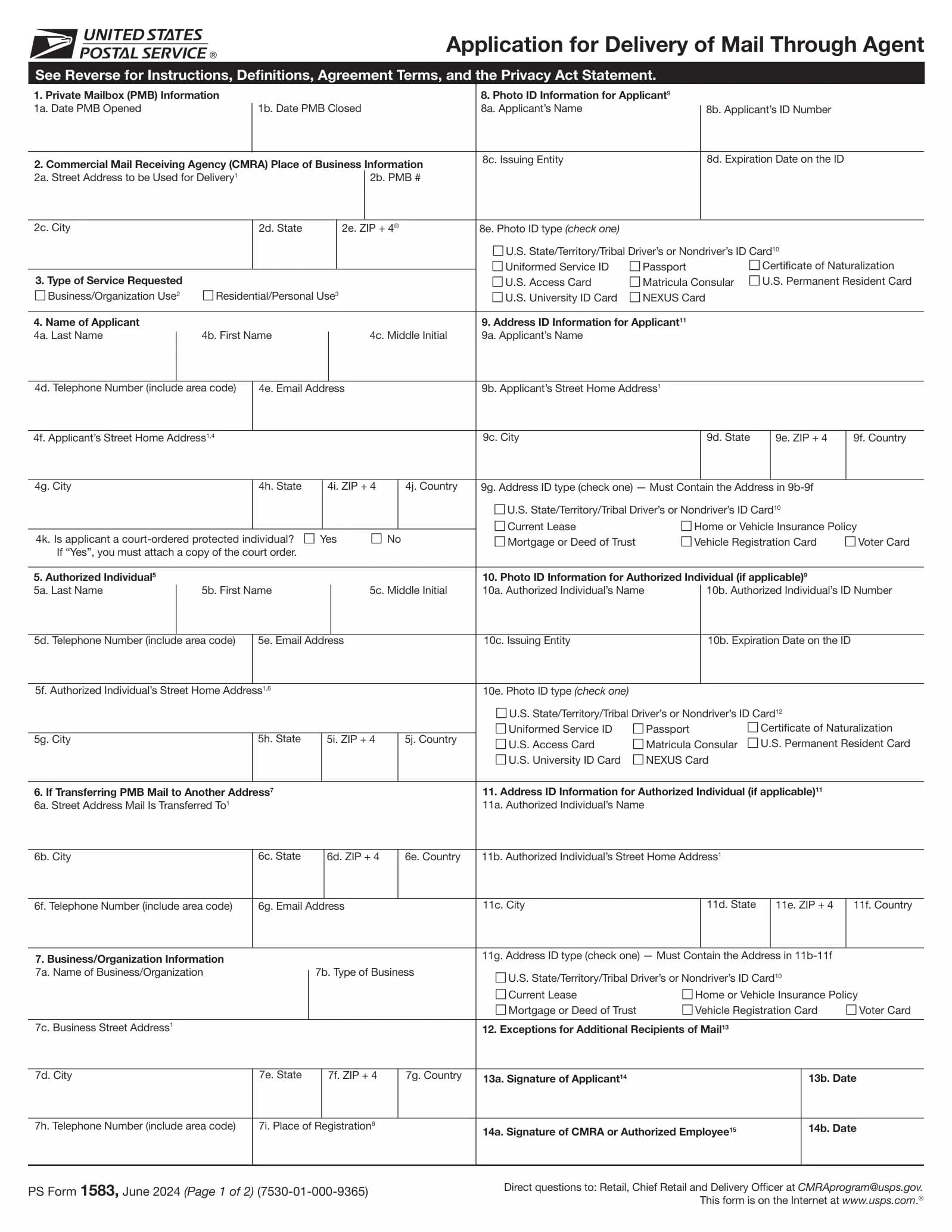
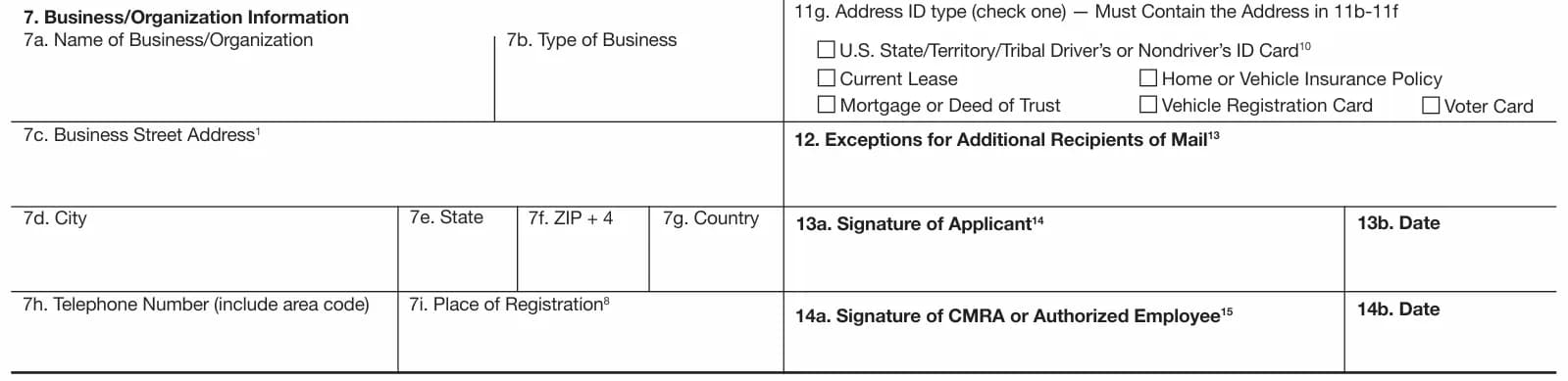
USPS splits the work: "The agent must complete items 2a–2e, and items 14a and 14b if necessary (i.e., if the agent is the witness), and the customer must complete all the other items" (Form 1583, page 2). Here is every item on the June 2024 edition.
| Item | What goes there | Who fills it |
|---|---|---|
| 1a–1b | Dates the mailbox (PMB) opened and closed | Provider |
| 2a–2e | The provider’s street address, your PMB number, city, state, ZIP+4 | Provider |
| 3 | Business/organization use or residential/personal use | You |
| 4a–4j | Your name, phone, email and home address, including country | You |
| 4k | Are you a court-ordered protected individual? If yes, attach the order | You |
| 5a–5j | An authorized individual who may collect your mail (optional) | You |
| 6a–6g | The address or email your mail is transferred to | You |
| 7a–7i | Business name, type, address, phone and place of registration | You (business use only) |
| 8a–8e | Your photo ID details | You |
| 9a–9g | Your address ID details | You |
| 10–11 | Photo ID and address ID of the authorized individual | You (if item 5 is used) |
| 12 | Other people receiving mail: business members, or your minor children | You |
| 13a–13b | Your signature and the date | You |
| 14a–14b | Signature of the provider or its employee, if they witnessed yours | Provider |
- 1Item 3, type of service. Tick business if a company will receive mail, then complete item 7. Tick residential if it’s just you. A shared personal mailbox needs a separate form for each adult.
- 2Item 4, you. Write your legal name as it appears on your ID, then your home address. Footnote 4 says this address "must match document provided in item 9b". Answer 4k: a protected individual’s details are only disclosed under a court order.
- 3Item 5, authorized individual. Optional. Name someone here only if they’ll pick up or manage your mail. They then need their own 2 IDs in items 10 and 11.
- 4Item 6, transfer address. Where your mail goes if it’s forwarded, including by email. Providers need this for the 6 months of re-mailing USPS requires after you close the box, so fill it in even if you only use scans.
- 5Item 7, business. Legal name, type (LLC, corporation, sole proprietorship), business address and phone. For 7i, "place of registration", write the county and state for a US company, or the country for a foreign one.
- 6Items 8 and 9, your IDs. Copy the name, ID number, issuing entity and expiry exactly from the document, and tick one type in each list. Attach copies of both.
- 7Item 12, extra recipients. For a business, list everyone who will receive mail there. Each of them may be asked to show 2 IDs to USPS. For personal use, list your minor children.
- 8Item 13, sign and date. Don’t sign early. You sign in front of your witness, which is the next section.
Does Form 1583 need to be notarized?
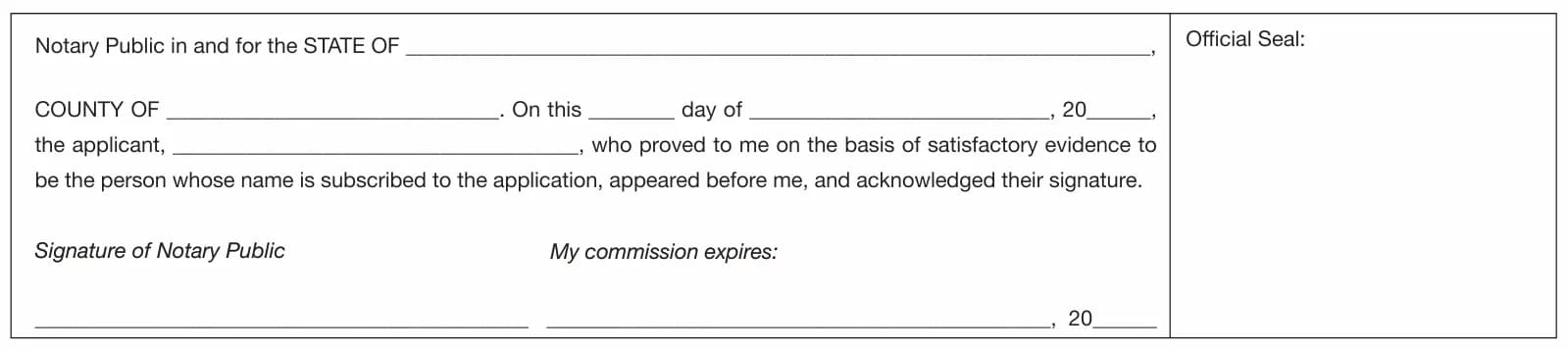
No. USPS doesn’t require Form 1583 to be notarized. A notary is one of two kinds of witness USPS accepts. The rule in the Domestic Mail Manual reads: the applicant "must sign or confirm his or her signature in the physical or virtual (in real-time audio and video) presence of the CMRA owner or manager, or authorized employee, or acknowledge his or her signature in the physical or virtual (in real-time audio and video) presence of a notary public commissioned in a United States state, territory, possession, or the District of Columbia" (DMM 508.1.8.3).
The 3 legal ways to sign Form 1583
| Route | Who witnesses | Where it’s recorded |
|---|---|---|
| In person at the provider | The CMRA owner, manager or an authorized employee, who checks your 2 original IDs | They sign item 14a |
| Live video with the provider | The same people, over real-time audio and video | They sign item 14a |
| Notary, in person or online | A notary commissioned in a US state, territory, possession or DC | The notary completes the block on page 2 and adds a seal |
Why some providers still ask for a notary
Staff witnessing isn’t new. USPS required CMRA owners or managers to witness Form 1583 from 1973, and only allowed a notary to do it from 1982 (89 FR 35716). What changed in 2024 is that the witness can now be on a live video call. A provider that insists on a notary is applying its own policy, not a USPS rule. It’s allowed to, so check before you sign up.
When did the Form 1583 rules change?
- July 1, 2023: providers must enter every Form 1583 into USPS’s online CMRA Customer Registration Database, and existing customers had to sign a new form (88 FR 32112).
- May 1, 2024: signing on live audio and video became valid, and the notary must hold a US commission (89 FR 35716). The text reached the online manual on July 14, 2024, but USPS says the standard took effect on May 1 (Postal Bulletin 22648).
- June 2024: the current edition of the form, with the signing rule printed on page 2.
USPS Form 1583 Explained
Unlock the Full Guide & Checklist
Enter your business email to read the rest of this breakdown, download the PDF edition, and receive official compliance updates.
How to complete Form 1583 online
You can do the whole thing without a printer. Most virtual mailbox providers now collect Form 1583 inside their own dashboard, then offer one or both remote signing routes.
Option 1: live video with your provider
An employee of the provider joins a real-time audio and video call, checks your 2 original IDs on camera, watches you sign or confirm your signature, and signs item 14a. USPS hasn’t prescribed how the call must be run, and it declined to require recordings (89 FR 35716). Each provider sets its own process and price.
Option 2: remote online notarization (RON)
A notary meets you on a video platform, verifies your identity, and applies an electronic signature and seal. For Form 1583 the only USPS condition is the notary’s commission: it must be from a US state, territory, possession or DC. Where you sit during the call isn’t mentioned in the USPS rule. State notary law decides the rest.
Fees are set by each state. Virginia, for example, lets a notary charge up to $25 for an electronic notarial act (Va. Code § 47.1-19), and its electronic certificate records where the notary was and whether the act was "in person or by remote online notarization" (§ 47.1-16). Platforms may add their own charges on top.
Before the call
Once signed, the form goes back to the provider, not to USPS. With VMH, you complete the form step by step in the dashboard, upload both IDs, and choose how your signature is witnessed. The product page walks through the flow.
Form 1583 for a business or LLC
A company receiving mail at a CMRA uses one Form 1583 with item 3 set to Business/Organization Use and item 7 completed. Footnote 14 adds that "an officer must sign the application and provide his or her title" (Form 1583). For an LLC, that is usually a member or manager.
Filling in item 7
- 7a Name of business: the legal name from your formation documents, including "LLC" or "Inc.".
- 7b Type of business: the entity type, such as LLC, corporation or sole proprietorship.
- 7c–7g Business street address: where the business is based. USPS may verify that you conduct business at this address, so don’t put the mailbox address here.
- 7h Telephone: a number that reaches the business.
- 7i Place of registration: "the county and state (if domestic), or the country (if foreign)".
Who else goes on the form
The officer who signs still gives their own 2 IDs in items 8 and 9. Everyone else who will receive mail at the mailbox is listed in item 12. They don’t need to attach IDs, but each "must, upon request, present two forms of valid ID to the Postal Service" (footnote 13). If someone should also collect or manage the mail, name them in item 5 and add their IDs in items 10 and 11.
Two businesses, one owner?
Item 7 has room for one business. The form doesn’t say how to handle a second company, so ask your provider whether it wants a separate form or lists it in item 12. Either way, a new or renamed company means a new form, because "when any information required on PS Form 1583 changes, the addressee must complete a new application" (DMM 508.1.8.3).
Form 1583 for non-US residents
You don’t need to live in the US or hold US documents to file Form 1583. The form has a country field for your home address (4j and 9f), and a foreign passport is an accepted photo ID (DMM 608.10.3).
The usual ID pair for someone abroad
- Photo ID: your passport. National ID cards and foreign driver’s licenses aren’t on the photo ID list.
- Address ID: a current lease, a mortgage or deed, or a home or vehicle insurance policy showing your home address. The form doesn’t limit these to US documents, but it doesn’t confirm foreign ones either, so your provider decides. Documents in another language may need a translation; ask first.
- Not accepted: utility bills and bank statements, which is where most applications from abroad stall.
Signing from outside the US
You can’t use a local notary in your country: USPS requires a notary "commissioned in a United States state, territory, possession, or the District of Columbia" (89 FR 35716). That leaves 2 routes: a live video session with your provider’s staff, or remote online notarization with a US-commissioned notary.
What about a US embassy? The USPS rule doesn’t mention consular officers, and a consular officer isn’t commissioned by a state. Ask your provider before booking an appointment.
After you submit: the CRD, updates and closing your mailbox
You don’t send Form 1583 to the Post Office. Your provider "uploads the original completed signed PS Form 1583 to the Postal Service’s CMRA Customer Registration Database and retains the completed signed copy at the CMRA business location" (Form 1583, page 2).
What your provider does with it
- Enters your details and uploads clear copies of both IDs to the CMRA Customer Registration Database (CRD). It may then delete its own ID copies (DMM 508.1.8.3).
- Keeps at least a digital copy of your signed form, open to USPS and Postal Inspectors at any time.
- Certifies in the CRD every quarter, by January 15, April 15, July 15 and October 15, that every form is current, closed boxes are recorded and no ID has expired.
- Writes your PMB address as "PMB 123" or "#123". Combining a suite and a box number, like "STE 11-234", isn’t allowed, and mail without the PMB or # can be returned.
How long does Form 1583 approval take?
USPS publishes no approval step or timeline for customers. The provider checks your IDs, witnesses or receives the notarized form, and enters it in the CRD. Most of the wait is how fast you and your witness find a time to sign.
Does Form 1583 expire?
There’s no fixed expiry date. But you file a new form whenever the information on it changes: a new home address, a new name, a new business, an added recipient (DMM 508.1.8.3). The CRD also flags expired photo IDs to your provider (88 FR 32112), so expect a request for a new ID when yours runs out.
What happens when you close the mailbox
- Nobody files a USPS change-of-address order. The form’s agreement rules that out (Form 1583).
- Your provider records the closing date and re-mails your mail with new postage for at least 6 months, to the address or email in item 6 (DMM 508.1.8.4).
- You can waive re-mailing in writing, but you can’t tell the provider to refuse or return your mail during those 6 months.
- After 6 months, First-Class, Ground Advantage Retail, Priority, Priority Express and accountable mail goes back to the Post Office. The provider keeps your form for at least 6 months after closing.
Is my Form 1583 information private?
USPS may confirm that an address belongs to a mail agent, but that disclosure "does not authorize the disclosure of the identities of persons on behalf of whom agents receive mail" (Privacy Act statement, Form 1583). Other disclosures are limited to listed cases such as legal proceedings and law enforcement.
PS Form 1583-A: how a mailbox provider registers with USPS
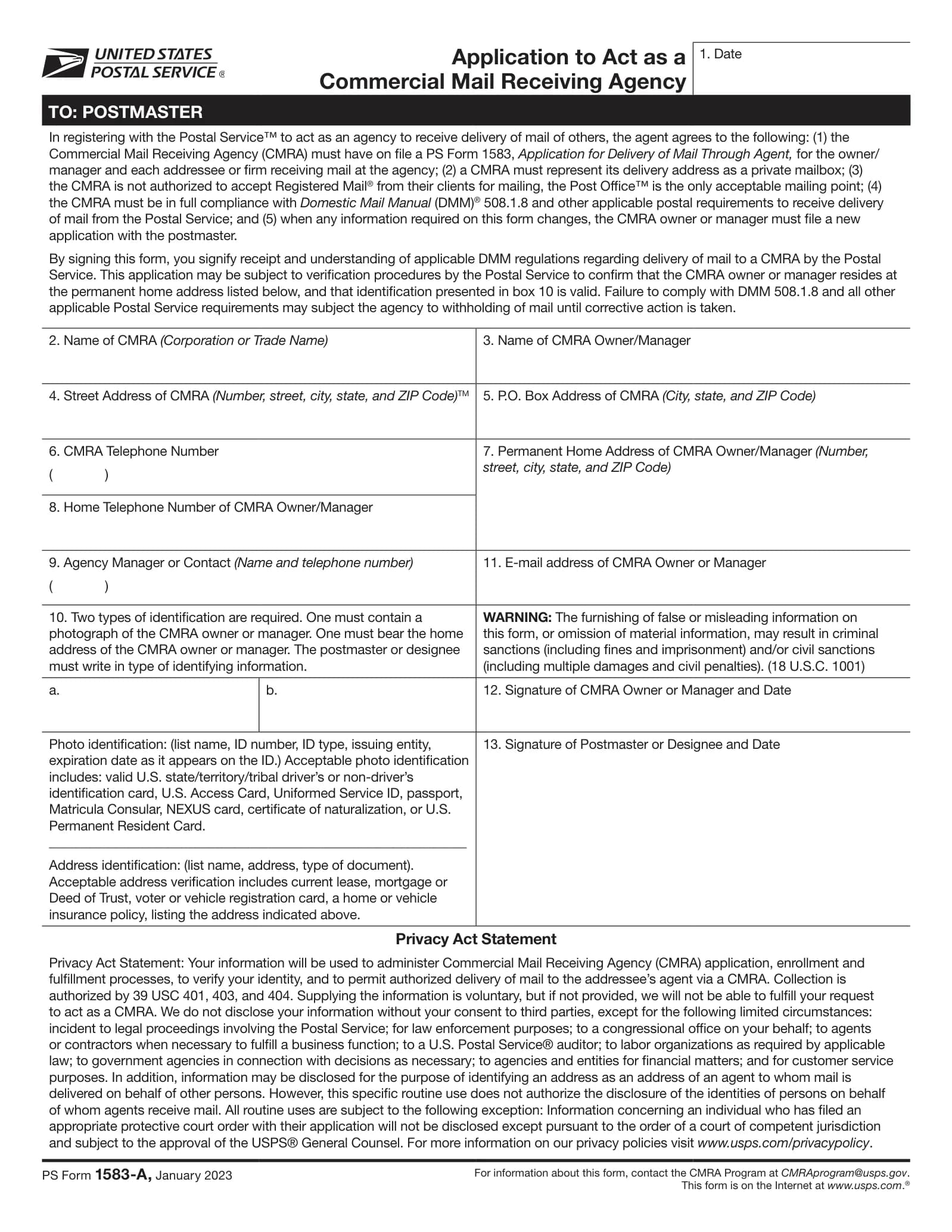
Form 1583-A, "Application to Act as a Commercial Mail Receiving Agency", is the provider’s side of the system. Anyone who "establishes, owns, or manages a CMRA" files it with the postmaster responsible for the delivery address (DMM 508.1.8.2). The current edition is January 2023 (PS Form 1583-A).
What 1583-A asks for
- The CMRA’s name, street address, any PO box and phone number.
- The owner or manager’s name, permanent home address, home phone and email.
- 2 IDs for the owner or manager, recorded by the postmaster in item 10: one with a photo, one with the home address.
- Signatures of the owner or manager and of the postmaster.
What the provider agrees to
- Keep a Form 1583 on file for the owner or manager and for every customer.
- Present its delivery address as a private mailbox.
- Not accept Registered Mail from customers for mailing. That goes through the Post Office.
- Comply fully with DMM 508.1.8, and file a new 1583-A whenever the information changes.
The postmaster verifies the owner’s home address, witnesses the signature, hands over a copy of the CMRA rules and uploads the form to USPS’s Facilities Database (DMM 508.1.8.2). If a provider falls out of compliance, USPS sends a written notice with 30 days to fix it. After that, delivery can be suspended and mail returned "Delivery Suspended to Commercial Mail Receiving Agency" (DMM 508.1.8.3).
Oversight is under scrutiny. A June 2025 audit by the USPS Office of Inspector General counted nearly 12,000 CMRAs and over 1.6 million registered customers, and found "missing or outdated applications, inaccurate data, and incomplete mail samples" (USPS OIG, 24-146-R25). A provider that is careless with its own paperwork puts its customers’ mail at risk.
Common Form 1583 mistakes and a final checklist
Why Form 1583 applications get rejected
- Address mismatch: the home address in item 4f isn’t the one on your address ID. The provider has to deny it.
- Wrong address document: a utility bill or bank statement instead of a lease, mortgage, insurance policy, vehicle registration, voter card or license.
- One license used twice: the same driver’s license as photo ID and address ID.
- Expired ID: check the expiry date in item 8d, and on your address document, before you start.
- Signed before the witness joined: you have to sign, or confirm your signature, in front of the provider’s staff or the notary.
- Foreign notary: the notary must be commissioned in a US state, territory, possession or DC.
- Old or edited form: use the June 2024 edition, unaltered.
- Missing officer title: on a business form, the signer must give their title.
Form 1583 checklist
Ready to set up an address? Compare plans on the pricing page. If you need a physical business address for a bank or platform rather than a mailbox, start with our proof of address guide.
Frequently asked questions
What is USPS Form 1583?
PS Form 1583, "Application for Delivery of Mail Through Agent", authorizes a Commercial Mail Receiving Agency (a virtual mailbox or private mailbox provider) to receive mail on your behalf. The provider must have one on file for every adult and business receiving mail at its address.
Does Form 1583 need to be notarized?
No. USPS accepts a signature witnessed by the provider’s owner, manager or authorized employee, in person or over live audio and video, or acknowledged before a notary commissioned in a US state, territory, possession or DC. Some providers require a notary as their own policy.
What IDs are acceptable for Form 1583?
Two. A photo ID such as a passport (US or foreign), a US driver’s license, a Permanent Resident Card or a Certificate of Naturalization, plus an address document such as a current lease, a mortgage, a home or vehicle insurance policy, a vehicle registration or a voter card.
Can I use a utility bill for Form 1583?
Usually not. Utility bills and bank statements are not on the address ID list printed on the form or in the Domestic Mail Manual. Use a lease, mortgage or deed, insurance policy, vehicle registration, voter card or driver’s license instead.
Can I complete Form 1583 online?
Yes. You can fill it in digitally and sign over live video, either with your provider’s staff or through remote online notarization with a US-commissioned notary. Your provider then uploads it to USPS.
Where do I send Form 1583?
To your mailbox provider, not to USPS. The provider uploads it to the USPS CMRA Customer Registration Database and keeps a signed copy.
Can a non-US citizen fill out Form 1583?
Yes. A foreign passport is an accepted photo ID and the form has a country field for your home address. You still need an address document from the form’s list, and a foreign notary doesn’t count.
Who signs Form 1583 for an LLC?
An officer of the company, such as a member or manager, who adds their title. They give their own 2 IDs, and anyone else receiving mail for the LLC is listed in item 12.
Does each person need their own Form 1583?
Each adult does, spouses included. A parent or guardian can list minor children on their own form without the children’s IDs. Business members receiving mail are listed on the business’s form.
Does Form 1583 expire?
It has no fixed expiry date, but you must file a new form when any information on it changes. If your ID expires, your provider will ask for a current one, because it certifies every quarter that no ID on file has expired.
What is the difference between Form 1583 and Form 1583-A?
Form 1583 is filed by each mailbox customer with the provider. Form 1583-A is filed by the provider’s owner or manager with the local postmaster to register the business as a Commercial Mail Receiving Agency.
What happens if I don’t file Form 1583?
Your provider can’t keep your mail. Mail for someone with no Form 1583 on file goes back to the Post Office the next business day, endorsed "No Authorization to Receive Mail for this Addressee".
Is Form 1583 the same as a USPS change of address?
No. Form 1583 authorizes an agent to receive mail sent to its address. It doesn’t redirect mail from your old address, and neither you nor the provider files a change of address when the mailbox closes.