Key Takeaways
- Amazon seller verification (Amazon calls it seller identity verification, or SIV) checks the primary contact’s ID, a proof of address, and for companies, business documents. Amazon usually decides within 2 business days, and its decisions are final.
- The ID must be a color, government-issued photo ID whose name, date of birth and number match what you typed exactly. Visas and trusted-traveler cards like Global Entry are refused.
- Bank, card and utility statements must be issued within the last 180 days, per Amazon’s help pages. A 2026 Amazon post says 90, so use one from the last 90 days.
- After the upload, Amazon asks for either a selfie with your ID or a video call with an associate. Bring the original documents to the call.
- Amazon may mail a postcard with a 6-digit code to your business address. You get 3 tries to enter it.
- Under the INFORM Consumers Act, sellers with 200+ sales and $5,000+ in a year certify their details annually, within 10 days of the prompt.
What Amazon seller verification is and why Amazon asks
Amazon seller verification is the identity and business check every new Seller Central account goes through before it can sell in the Amazon store. Amazon calls it seller identity verification (SIV). It says the check exists "to maintain a trusted store for buyers and sellers" (source).
It is the last of 5 registration steps on sell.amazon.com: business information, seller information, billing, store and product information, then identity verification. Amazon says registration can take "just a few hours" and verification "usually takes three business days or less".
The 4 things Amazon verifies
- The person: the primary contact’s government photo ID. The primary contact is the person who registers and runs the account, and Amazon treats their actions as the account holder’s (source).
- The address: a bank, card or utility statement proving the address, and sometimes a postcard code mailed to it.
- The business: for companies, a certificate of good standing or business license, plus documents linking the contact to the company.
- The contact details and payments: a phone number checked by PIN, a chargeable credit card and a bank account for payouts.
When Amazon asks: at signup, and again later
Most sellers meet verification once, at registration. Amazon also re-verifies when your details change. Under the INFORM Consumers Act, it must re-verify changed information for high-volume sellers and ask them to certify their details at least once a year (source). A News_Amazon post adds that you must verify "when you register to sell in our store or changes occur in your account" (source).
Amazon seller verification documents: the full list
The person registering the account provides an identity document and a proof of address. Business sellers add business verification documents (source). The lists below come from Amazon’s page for sellers whose business location is the United States (source).
| What is verified | Documents Amazon accepts | Key rules |
|---|---|---|
| Your identity | Passport, passport card, national ID card, driving license, enhanced driving license, citizenship card, permanent residency card, health card or military ID. | Color copy. Name, date of birth, ID number and expiry match what you typed exactly. Holder 18 or older. |
| Your address (individual sellers) | Bank statement, credit card statement or a Payoneer, Hyperwallet, World First or Alipay statement, certified bank letter, utility bill, lease, credit union or mortgage statement, tenancy bill, benefits letter, or tax document with the address. | Issued in the last 180 days. Shows your name and address, and the issuer’s name or logo. |
| Your address (professional sellers) | The same list without the certified bank letter and benefits letter, plus a business license or business extract. | Must show the name of the business or entity. |
| Your business | Certificate of good standing, a business license issued or renewed in the last 180 days, a registry extract, or a tax clearance certificate. | Issued by a government authority, showing the business name, registration number and issue date. |
| Your link to the business | A letter of authorization, articles of association, incorporation documents or a business license. | Needed when the primary contact isn’t the business owner or legal representative. |
What Amazon won’t accept
- Visas and travel permits. Amazon’s FAQ says it doesn’t accept "visas or travel permit documents, such as NEXUS, SENTRI, or Global Entry" (source).
- Screenshots and blurry photos. Use "high-quality color scans or photos that show all four corners" (source).
- Handwritten address proof. A proof of address "cannot be handwritten" (source).
- Edited or locked files. Documents must be "authentic and unaltered" and not password-protected.
- Old statements. Anything older than 180 days fails the address check.
File and language rules
- TIF, TIFF, PNG, JPG, JPEG or PDF, under 50 MB. No $, & or # in the file name (source).
- Show the full document: front and back, not angled, not cropped. If the page has only one upload box, merge the front and back into one file.
- Languages Amazon reads: Arabic, Simplified Chinese, Dutch, English, French, German, Hindi, Italian, Japanese, Polish, Portuguese, Spanish, Swedish, Tamil, Thai, Turkish and Vietnamese. Anything else needs a notarized translation uploaded with the original.
- On a bank statement you can hide the account number and amounts, as long as the rest stays visible (source).
How to verify your Amazon seller account, step by step
Here is the Amazon seller verification process in the order you meet it, from the first form to an approved account.
Step 1: Enter the business exactly as registered
Choose the country where the business is registered and its business type, or "None, I am an individual" if you aren’t incorporated. You don’t need an LLC to sell on Amazon. Then enter the business name "used to register your business with the relevant government office", its registration number (Amazon notes it "isn’t the same as your Employer Identification Number"), and "the address that appears on your business license" (source). Check both choices carefully: business location and type usually can’t be edited after you click Agree & continue (source).
Step 2: Enter the primary contact from your ID
Copy your full legal name including middle names, your country of citizenship, country of birth and date of birth from your passport or ID, then your home address. Amazon verifies your phone with a 6-digit PIN by text or call. Then you say whether you are a beneficial owner, a legal representative, or both.
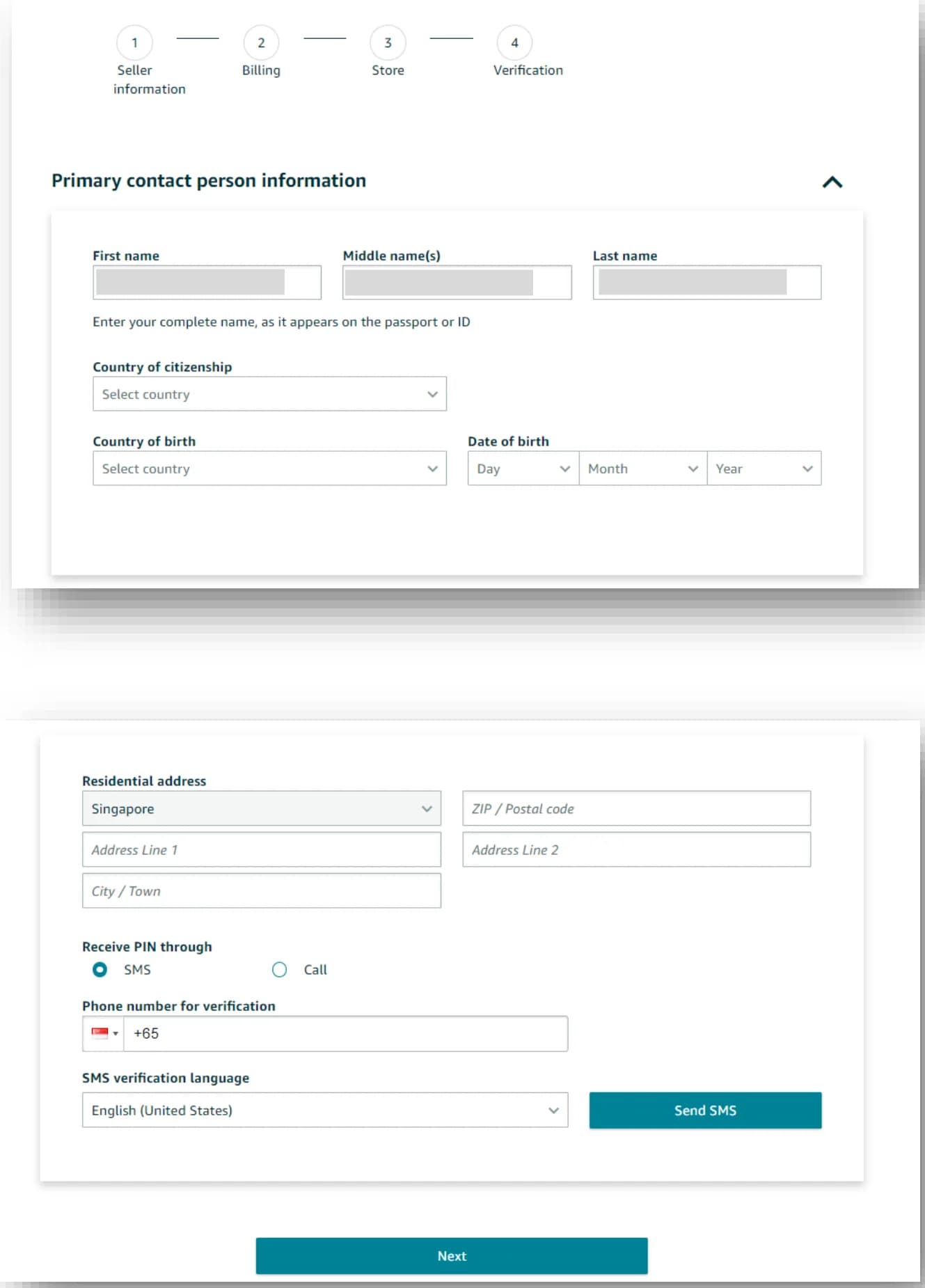
Step 3: Add billing and a payout account
Add a credit or debit card that can be charged internationally. Amazon accepts American Express, Diners Club, Discover, JCB, Mastercard and Visa. The card "does not need to be under your name or the name of your business". The payout bank account must be in your name or your business’s name, and it doesn’t have to be a US account (source).
Step 4: Upload your ID and proof of address
On the Identity and Address Verification page, upload both sides of your ID, choose the proof-of-address type from the dropdown, and upload the statement. Business sellers also confirm their business and beneficial-owner details and upload the business documents (source).
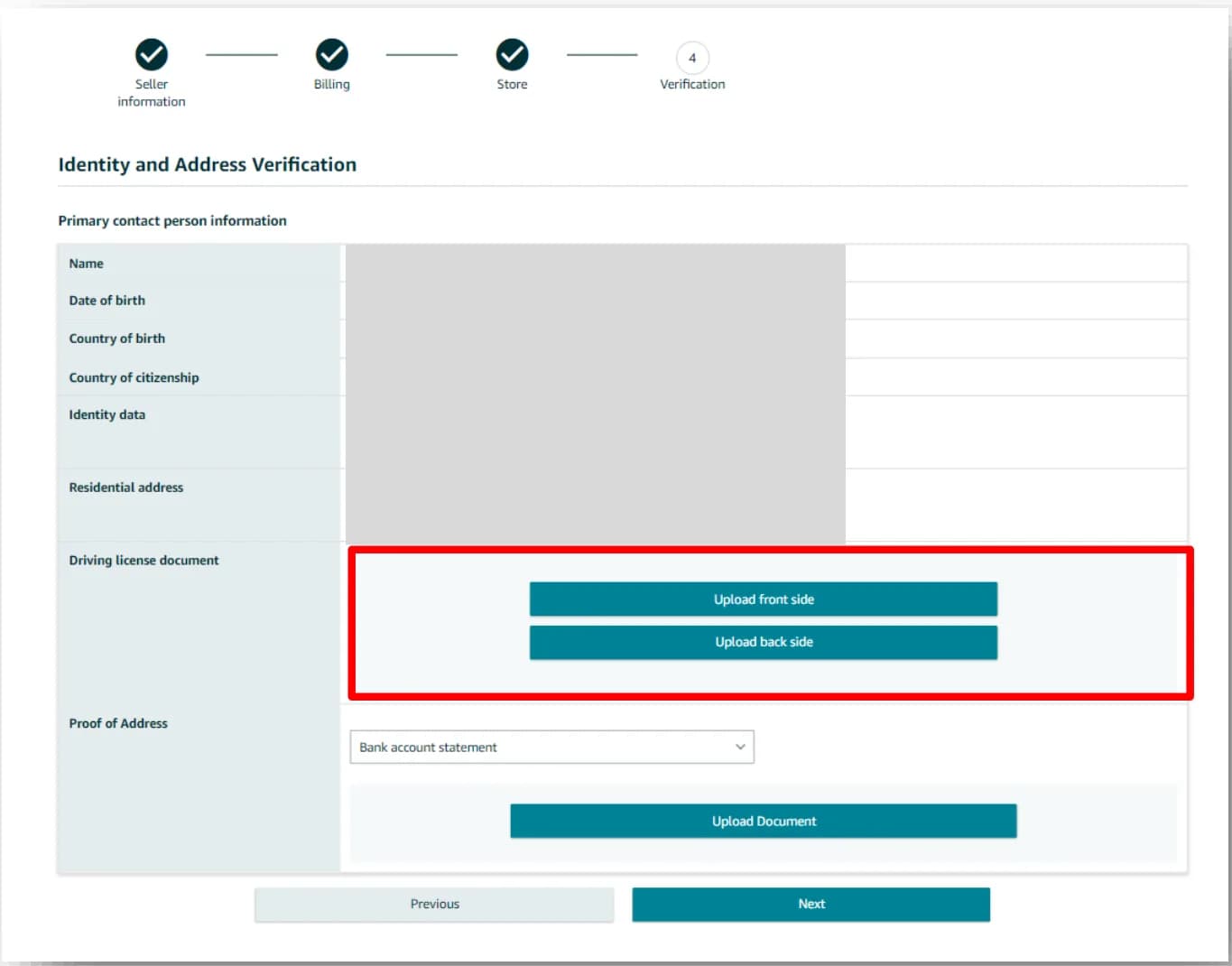
Step 5: Take a selfie or join a video call
Next, Amazon asks you to "Take a photo of your face and government-issued ID" or to "Join or schedule a video call with an Amazon associate" (source). Amazon picks which one you get. The video call is covered in the next section.
Step 6: Wait, and don’t resubmit
Seller Central shows a confirmation, and Amazon "might contact you for further clarification, if needed, within two business days". Its instruction is blunt: "Do not resubmit documents or submit an appeal while we’re reviewing your information." If Amazon asks for new documents, you have 30 days. After that, onboarding closes (source).
How long does Amazon seller verification take?
Amazon’s FAQ says verification "could take up to two business days" once it has everything (source). sell.amazon.com says it "usually takes three business days or less" (source). A scheduled video call or a mailed postcard adds days on top. Where you go to check: Settings > Account Info > Identity Verification (source).
Amazon video verification call: what to expect
The Amazon video verification call is a short live check with an Amazon associate. It confirms that the person on camera is the person on the documents you uploaded. Amazon calls it virtual identity verification, and older guides call it in-person verification (IPV).
Instant call or scheduled appointment
You pick a language, then either join the next free associate or book a slot. An Amazon staff post puts the instant queue at 3 to 6 minutes and scheduled slots at 2 to 7 business days out, with calls lasting 10 to 20 minutes (source). Amazon’s guide adds that the call "may be recorded for quality and audit purposes" (source).
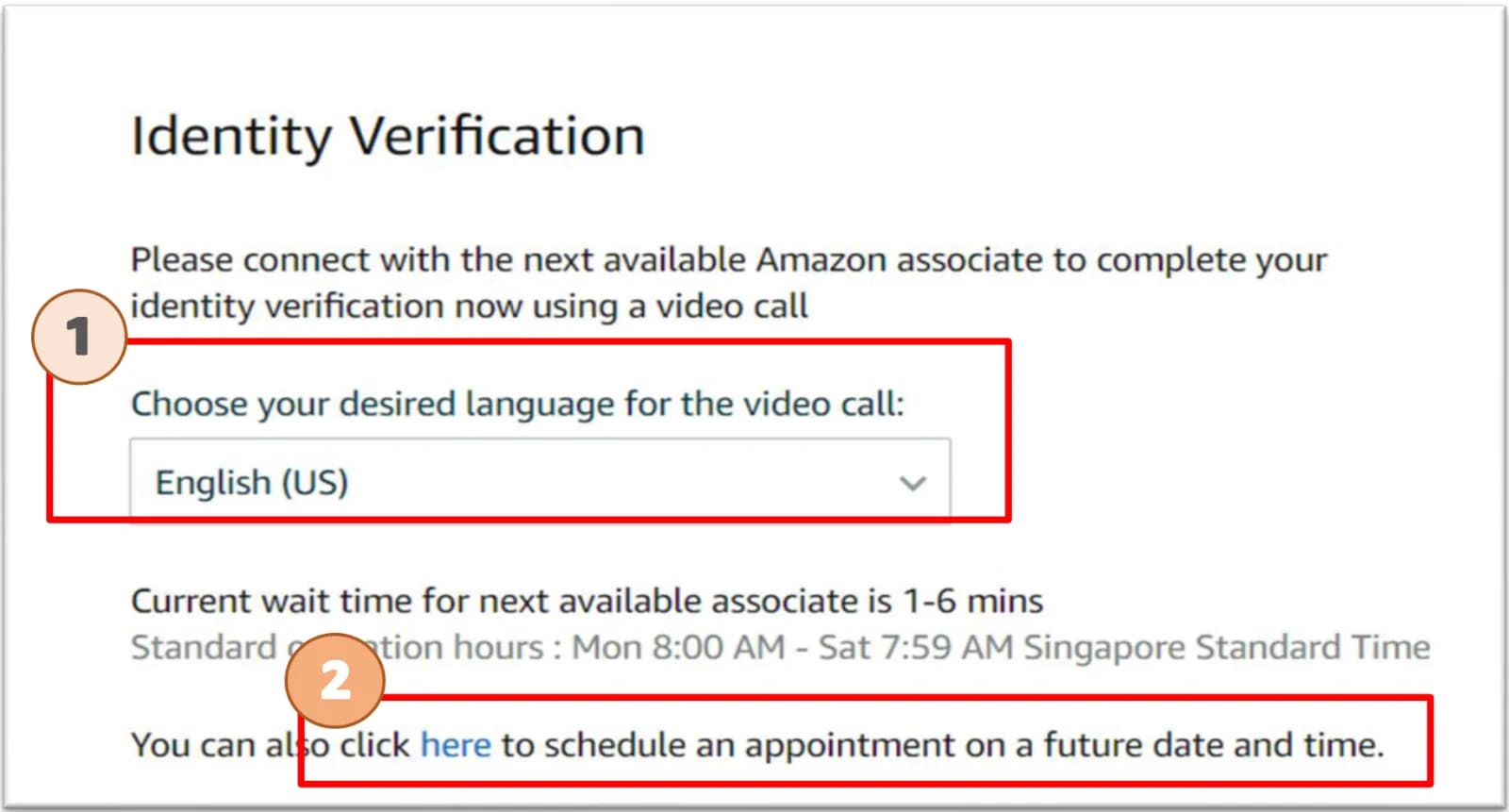
What to have in front of you
Device and browser
- Browser: Chrome (recommended) or Firefox on Windows, Safari on iPhone and Mac, Chrome on Android (source).
- A front-facing camera, a microphone and at least 1.5 Mbps of internet.
- Turn off any VPN. It is Amazon’s first fix for "Something went wrong".
- If you’re asked to upload during the call: DOCX, JPEG, JPG, PDF or PNG, under 4 MB per file.
- A quiet room with good light. Test your camera and audio before the appointment.
What the associate checks
Expect them to compare your face to the ID photo, look at both sides of each original, and confirm that the details match your uploads. They may ask simple questions about who owns and runs the business. Answer as the primary contact yourself. Nobody else should be answering for you or controlling the account.
Amazon Seller Verification
Unlock the Full Guide & Checklist
Enter your business email to read the rest of this breakdown, download the PDF edition, and receive official compliance updates.
Amazon address verification and the postcard code
Amazon address verification confirms that your business address is real and that you receive mail there. Amazon says it "must verify the business address that you provided during registration or may have updated since you registered" (source). There are two ways it does that: a document upload, and sometimes a postcard with a code.
Uploading proof of address
Open Account Information, click the pending verification item, confirm or add the address, and upload a proof-of-address document. It must be issued within the last 180 days, show the provider’s name, stamp or logo, and show "the name and address of the account holder" (source). If you need to verify your phone too, do the phone first (source).
How the Amazon verification postcard works
- Go to Account Info > Business Information > Business Address and Phone Number, confirm the address and submit.
- Amazon mails "a postcard with a 6-digit verification code to your address via regular mail". Delivery "typically takes 5-7 business days" (source).
- The page shows the delivery estimate and a tracker: Preparing, Dispatched, In transit, Delivered.
- When the card arrives, enter the code on the same page. You have 3 tries. Amazon’s guide warns: "do not key in false OTPs" (source).
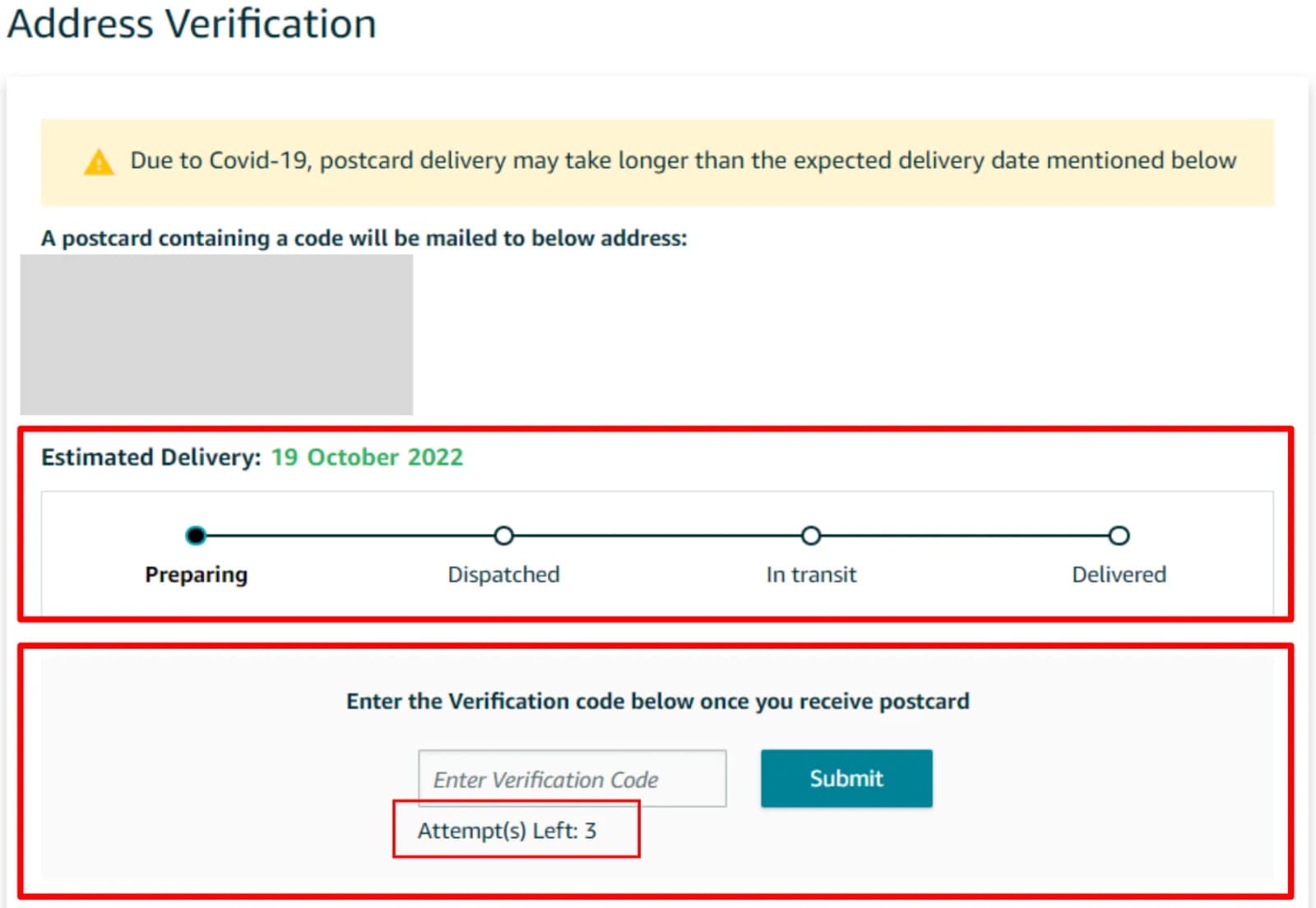
Amazon postcard not received?
- Wait out the 5 to 7 business days before you do anything.
- Check the address on the verification page for typos, a missing unit number or the wrong ZIP code. A postcard can’t reach an address that is typed wrong.
- Make sure someone collects mail there. If the address is a mail service, confirm it accepts mail for your business name.
- Don’t guess the code. After 3 wrong tries you have to contact Selling Partner Support to continue.
- Not every seller gets a postcard. Amazon’s guide calls it "not a required stage for all sellers".
Amazon business address requirements and the INFORM Act
Amazon asks for a few different addresses, and each has its own rules. The most visible one is the business address: Amazon shows it to buyers on your Seller Profile page, and it "will be used on all returns" (source).
| Address | What it is | What Amazon says |
|---|---|---|
| Registered business address | Where the company is registered. | "Enter the address that appears on your business license" (source). |
| Business address (public) | What buyers see on your Seller Profile. | For companies, "the address your business is registered under"; for individuals, the operating address (source). |
| Residential address | Where the primary contact lives. | Entered from your ID and proven by a statement in your name. |
| Card billing address | On file with your card issuer. | Must match the billing address on your card statement (source). |
Does Amazon accept a PO box or virtual address?
Amazon publishes no ban. Its help page says the Seller Profile will "display the business address (street address or P.O. Box)" (source). What actually decides it is the proof. You need a document dated within 180 days showing the business name at that address, and a professional seller’s address should match the business license. If Amazon mails a postcard, you have to receive it there. Amazon’s own 2022 guide puts it plainly: "Fill in an address for which you can provide utility bills" (source).
- PO box: Amazon displays it if it is your business address. You still need a qualifying document showing it.
- Private mailbox (PMB) or virtual mailbox: a real street address with a PMB number. It receives the postcard, but a bank statement or utility bill at that address has to exist in the business’s name. Our guide to CMRA addresses explains how platforms identify them.
- Registered agent address: it is on your formation documents, but usually no statement is sent there in your company’s name. It can fail the proof step.
- Your home: simplest to prove, but it is public on your Seller Profile unless the INFORM exception applies (below).
INFORM Consumers Act: who it covers
The INFORM Consumers Act took effect on June 27, 2023. It applies to sellers who, in any continuous 12 months during the previous 24, sold "200 or more new or unused consumer products and have had $5,000 or more in gross revenues". For these sellers, Amazon must collect and verify "your name, a government-issued identification document, a business address, bank account information, a working email address, a working phone number, and a tax identification number" (source).
Annual certification: the 10-day clock
At least once a year, Amazon asks high-volume sellers to certify that their details are current. The request arrives by email, in performance notifications and on the Account Health page. "Once you go to the Notice and Certification page, you will be required to complete electronic certification within 10 days to avoid account deactivation." If an account is deactivated, it is reinstated "in 48-72 hours" after verification and certification are done (source).
What buyers see, and the home-address exception
The FTC says a marketplace must disclose the name, physical address and contact details of sellers with $20,000 or more in annual gross revenue. A seller with only a residential address can ask the marketplace to show just the country and state, as long as they answer buyer questions in a reasonable time (source). Ask Selling Partner Support about that option before you move your business address only for privacy.
Amazon seller verification for non-US sellers and US LLCs
Amazon accepts sellers from a long list of countries. To be eligible, you "must be resident in one of the following countries, have a valid phone number, and have an internationally chargeable credit card" (source). You can sell in the US store as an individual from your home country, or through a US company.
Selling with a US LLC from abroad
- Business location: United States, because that is where the LLC is registered (source).
- Business documents: a certificate of good standing from your formation state dated in the last 180 days (Amazon notes some places call it a "certificate of existence"), plus your articles of organization to link you to the company (source).
- Primary contact: you, verified with your own passport and a statement showing your home address abroad.
- Proof of business address: a document at the LLC’s US address in the company’s name, if Amazon asks for one.
- Tax: the tax interview decides whether you file a W-9 or a W-8BEN (source). The company registration number is not your EIN, but Amazon still needs your tax details. Our EIN guide for non-US founders covers getting one without an SSN.
- Payouts: a US bank isn’t required. Amazon Currency Converter pays out to supported countries (source).
The country-match rule
If your ID was issued by a different country from the one you live in, Amazon’s rule is: "make sure that your proof of address does match the country of residence" (source). A Turkish passport holder living in Germany, for example, uploads a German bank statement. Amazon’s 2022 guide says the address on the statement doesn’t have to match the registered address, but "we do check if the country for both documents match" (source).
Beneficial owners and representatives
Business sellers name each beneficial owner: anyone who directly or indirectly owns more than 25%, or, if nobody does, a senior manager. You can list up to 4 at registration. If the primary contact isn’t a legal representative, a director or owner signs a dated letter of authorization, and Amazon publishes the wording (source).
Amazon seller verification failed: common causes and fixes
Amazon says a document usually fails because it "does not meet the document requirements criteria or it is not an acceptable proof of identity" (source). These are the mismatches behind most rejections, with the fix for each.
| What went wrong | The fix |
|---|---|
| The name doesn’t match the ID, for example a missing middle name or reversed order. | Type your name exactly as printed on the ID. Amazon says small differences "can cause delays" (source). |
| The ID number, date of birth or expiry was mistyped. | These must be "an exact match with the document". With no expiry date, enter a date 3 months after registration. |
| Black-and-white, cropped or blurry photo. | Retake in color, all 4 corners in frame, no glare. |
| The statement is more than 180 days old, or has no date. | Upload one from the last 90 days that shows the issue or transaction dates. |
| The statement is in a spouse’s or landlord’s name. | Use a document in your own name, or the business name for a professional account. |
| The ID country and residence country differ. | Prove your address with a document from the country you live in. |
| The certificate of good standing is old. | Order a new one from the state. It must be current as of the last 180 days. |
| The card fails. | It must expire at least 6 months out, can’t be prepaid or virtual, and needs the right name and billing address (source). |
What not to do
- Don’t resubmit while a review is open. Amazon’s 2022 guide warns that "too many resubmissions with the same invalid documents will result in the failure of SIV" (source).
- Don’t edit a document. Files must be "authentic and unaltered".
- Don’t email documents. Amazon accepts them only through Seller Central (source).
- Don’t let the 30-day resubmission window lapse, or onboarding closes.
- Don’t open a second account to start over. If an established account is deactivated, follow the reactivation steps. Our Amazon account suspension guide covers them.
Changing details after you’re approved
A new bank account starts a 3-day security hold on payouts (source). A new business address or phone number is verified again, and old addresses "cannot be permanently deleted" (source). Change them only when you have the proof ready.
Amazon seller verification checklist before you submit
Run through this once before registration, and again whenever Amazon asks you to re-verify.
Frequently asked questions
What is Amazon seller verification?
Amazon seller verification, or seller identity verification (SIV), is Amazon’s check of the person and business behind a seller account. Amazon reviews a government photo ID, a proof of address and, for companies, business documents, and may add a video call or a postcard code.
How long does Amazon seller verification take?
Usually 2 to 3 business days once Amazon has every document. A scheduled video call can add 2 to 7 business days, and a postcard takes about 5 to 7 business days to arrive.
What documents are needed for Amazon seller verification?
A color, government-issued photo ID and a proof of address issued in the last 180 days, such as a bank, credit card or utility statement. Companies also need a certificate of good standing or a business license and documents that link the primary contact to the company.
Can I use a driver’s license for Amazon verification?
Yes. Amazon accepts driving licenses, passports, national ID cards and several other government photo IDs. Upload both sides in color. Visas and trusted-traveler cards like Global Entry are not accepted.
What happens on the Amazon video verification call?
An Amazon associate checks your face against your ID and asks to see both sides of the original documents you uploaded. Calls usually take 10 to 20 minutes. Use Chrome or Safari and turn off any VPN.
How do I schedule an Amazon verification video call?
After you upload your documents, Seller Central offers an instant call or a link to schedule an appointment on a future date. Scheduled slots are usually 2 to 7 business days out. If you miss one, Seller Central prompts you to rebook.
What is the Amazon verification postcard?
A postcard Amazon mails to your business address with a 6-digit code. You enter the code under Account Info > Business Address and Phone Number. You have 3 tries, and not every seller gets one.
Why was my Amazon seller verification rejected?
Usually a mismatch: a name that differs from the ID, a mistyped ID number, a statement older than 180 days, a cropped or black-and-white image, or a proof of address from a different country than the one you live in.
Can I appeal a failed Amazon identity verification?
No. Amazon says verification decisions are final. If Amazon asks you to resubmit instead, you have 30 days to upload new documents through Seller Central.
Does the bank statement address need to match my Amazon address?
Not always. For identity verification, Amazon checks that the name and the country match. For address verification, the document must show the address being verified. Using one address everywhere avoids both problems.
Can I use a PO box or virtual address for Amazon?
Amazon doesn’t ban them, and it displays a PO box on the Seller Profile if that is your business address. You still need a document dated within 180 days that shows the business at that address, and you must be able to receive a postcard there.
Can a non-US resident sell on Amazon US?
Yes, if you live in one of Amazon’s accepted countries and have a valid phone number and an internationally chargeable credit card. You can register as an individual or through a US LLC, and a US bank account isn’t required.
What is the INFORM Consumers Act verification on Amazon?
A US law that makes Amazon verify and yearly certify the details of sellers with 200+ sales and $5,000+ in revenue in 12 months. When Amazon asks, you have 10 days to certify or the account can be deactivated.