Key Takeaways
- Amazon calls it a deactivation, not a suspension. Your Account Health page shows why it happened and has a Reactivate your account button that starts the appeal.
- The Account Health Rating runs from 0 to 1,000. Below 200 your account is At Risk, below 100 it is eligible for deactivation, and a single critical violation drops it to 0 with a 3-day window to fix it.
- An Amazon plan of action answers 3 questions: what caused the problem, what you already changed, and what stops it happening again. Amazon asks for facts, dates and documents, not emotion.
- Invoices must come from a real supplier, be dated within 365 days of the notice, cover the units you sold and show product identifiers. Pro forma invoices and editable files are rejected.
- Amazon says to expect a reply to an appeal within 2 days. It can withhold your funds while risk persists, and permanently for counterfeit or fraud.
- Don’t open a new seller account to get around a deactivation. Amazon can deactivate every related account until all of them are in good standing.
Amazon seller account suspended or deactivated: what it means
If your Amazon seller account is suspended, you get it back with an appeal, and the heart of that appeal is an Amazon plan of action: a short, factual explanation of what went wrong, what you fixed and how you’ll stop it happening again. This guide walks through why Amazon deactivates sellers, how to write that plan of action, and what happens to your money and inventory in the meantime.
First, the vocabulary. Sellers say "suspended". Amazon’s help pages say "deactivated" and talk about the "restriction or removal of selling privileges" (source). The contract you signed, the Business Solutions Agreement, says Amazon may "suspend or terminate your account" (source). In practice they mean the same thing: you can’t sell until Amazon accepts your appeal.
Deactivated vs suspended vs at risk
| What you see | What it means | Can you still sell? |
|---|---|---|
| At Risk (yellow Account Health Rating, 100 to 199) | Your account is at risk of deactivation because of unresolved policy violations. | Yes, for now. Fix the violations before they add up. |
| Critical violation (rating drops to 0) | One serious violation, or too many repeats of the same policy. You get a 3-day grace period. | Yes, for 3 days. Miss it and the account is deactivated. |
| Deactivated (red, 99 or lower) | Your selling privileges are removed until Amazon accepts an appeal. | No. Listings are down and Amazon can hold payouts. |
| Listing removed | One product is blocked, not the whole account. | Yes, except that listing. |
The Account Health Rating drives policy deactivations
Amazon’s Account Health Rating (AHR) is a color-coded score from 0 to 1,000, shown on your Account Health page for each store you sell in. New sellers start at 200, and the score reflects the last 180 days. Green (200 to 1,000) means Healthy, yellow (100 to 199) means At Risk, and red (99 or lower) means "your account is either eligible for deactivation or already deactivated" (source). When Amazon launched the current version in 2022, it called the rating "the determining factor for account suspension based on accumulated policy violations" (source).
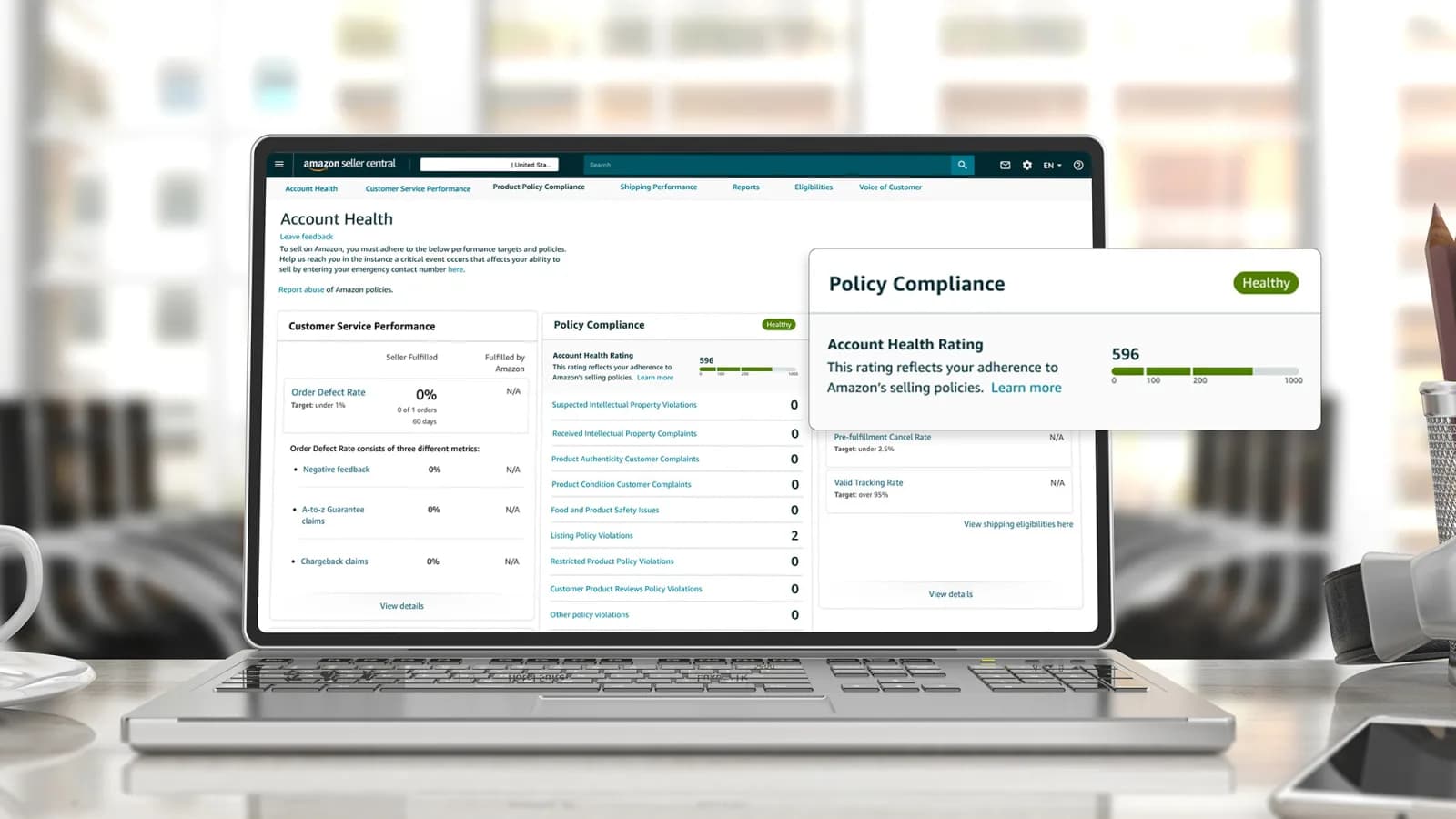
Every violation costs points, usually 2 to 8 depending on severity, and repeats of the same policy can cost double. You earn 4 points back for every 200 orders you fulfill over 180 days (source). A critical violation sends the score straight to 0.
Why Amazon suspends seller accounts
Almost every deactivation falls into one of 4 buckets. Your notification and your Account Health page tell you which one, and the plan of action you write depends on it.
1. Policy violations (the Account Health Rating)
The rating counts violations of 15 policies, including anti-counterfeiting, intellectual property, restricted products, product safety, customer product reviews, product detail page rules and the seller code of conduct (source). Amazon grades each violation by severity. These are its own examples (source):
| Severity | What happens | Amazon’s examples |
|---|---|---|
| Critical | One violation qualifies the account for deactivation. Rating goes to 0, 3-day grace period. | Counterfeit or pirated product confirmed by a test buy; asking for reviews or non-compliant inserts; damaging another seller; manipulating search results or sales rank. |
| High | Minimal tolerance. | A valid infringement notice from a rights owner; customer reports of infringing or counterfeit products. |
| Medium | Hurts the rating if it keeps happening. | Listings that link to external websites. |
| Low | Tolerated if infrequent. | A customer received an expired item, or a used item listed as new. |
Repeats matter more than most sellers expect. Reach 5 infringement violations, or 2 restricted-products violations, within 180 days and Amazon raises a critical violation with the same 3-day window (source). That’s why an IP complaint you ignored months ago can resurface as a deactivation.
2. Missed performance targets
If you ship orders yourself, Amazon’s Order Performance policy sets hard floors (source). Missing them "may result in loss or restriction of selling privileges".
| Metric | Amazon’s target | Measured over |
|---|---|---|
| Order Defect Rate (negative feedback, A-to-z claims, chargebacks) | Under 1% | 60 days |
| Pre-fulfillment Cancel Rate | Under 2.5% | 7 days |
| Late Shipment Rate | Under 4% | 10 and 30 days |
| Valid Tracking Rate | 95% or more in each category | 30 days |
| On-Time Delivery Rate | 90% or more, without promise extensions | Rolling |
These metrics mostly hit seller-fulfilled offers, not the whole account. An Order Defect Rate over 1% can remove your self-shipped offers (source), and a low Valid Tracking Rate suspends seller-fulfilled listings in that category only; FBA listings aren’t affected (source). Fraud chargebacks don’t count toward your Order Defect Rate, but service chargebacks do.
3. Related accounts and the code of conduct
The seller code of conduct allows 1 Seller Central account per region unless you have "a legitimate business need" and every account is in good standing. The consequence is blunt: "If any of your accounts are not in good standing, we may deactivate all of your selling accounts until all accounts are in good standing" (source). Amazon’s examples of a legitimate need are separate businesses for separate brands, manufacturing for 2 distinct companies, or an Amazon program that requires a separate account.
The same policy bans paying or offering anything for reviews, asking only happy customers for reviews, contacting customers outside Buyer-Seller Messaging, sending buyers to another website and giving Amazon inaccurate information. Any of these can end in a deactivation on its own.
4. Suspected fraud, harm or verification problems
Some deactivations don’t cite a single policy at all. The Business Solutions Agreement lets Amazon act immediately if an account "may be used for deceptive or fraudulent, or illegal activity" or could harm customers, other sellers or Amazon (source). Sellers call these "Section 3" deactivations, covered further down. Amazon can also ask you to verify your identity or business again at any time, and the agreement makes that information a condition of payouts after a suspension.
What to do first if your Amazon account is suspended
The first few hours decide how hard the appeal will be. Before you write a word, do these in order.
- 1Check the notice is real. Fake "your account is suspended" emails are common. Don’t click the link; sign in to Seller Central yourself and open Account Health. If nothing is there, the email wasn’t from Amazon (source).
- 2Read the whole notification. Note the policy cited, the ASINs listed at the bottom and any deadline. Amazon asks for evidence for every ASIN on that list (source).
- 3Check for a 3-day window. A critical violation gives you 3 days before deactivation (source). If you’re inside that window, fix and appeal now.
- 4Call Account Health Support. Professional sellers can use Contact us or Call me now on the Account Health page (source). Ask what evidence the team needs.
- 5Pull your data. Download order reports, the Order Defect Rate report and any performance notifications before you lose context. You’ll quote from them.
- 6Gather supplier documents. Invoices, supplier contact details, authorization letters and test reports. The invoices section below lists what Amazon accepts.
- 7Don’t open a second account. It turns one problem into a related-accounts problem.
How to write an Amazon plan of action
An Amazon plan of action (POA) is the written part of your appeal. Amazon’s current help pages call it an appeal, and sometimes the form breaks it into a questionnaire, a quiz or an acknowledgement of the violation (source). Whatever the format, Amazon is looking for the same 3 things.
The 3 parts Amazon wants
- Root cause: why the violation happened. Amazon says to "look for the root causes that led to the violations" and gives examples: "unverifiable suppliers, inventory management issues, or quality control issues" (source).
- Corrective actions: what you have already done about it. Amazon wants "specific actions that you have taken to address the root causes, making sure to include specific actions, dates of changes, or documentation".
- Preventive measures: what stops it recurring. Amazon’s on-time delivery appeal, for example, asks for "the steps that you’ve taken to prevent future issues" (source).
Amazon’s own writing rules
Amazon publishes guidelines for appeals (source). Paraphrased:
What weakens a plan of action
- Blaming Amazon, a buyer or a competitor. Even when it’s partly true, it isn’t a root cause you control.
- Promises in the future tense only. "We will improve" without a date or a document reads as nothing done yet.
- Generic templates pasted unchanged. The actions must match the violation on your notice.
- Denying a violation you actually committed. If it was an error by Amazon, file a dispute instead (covered in the next sections). If it happened, own it.
- Walls of text. Short numbered points are easier to check.
Amazon Account Suspended
Unlock the Full Guide & Checklist
Enter your business email to read the rest of this breakdown, download the PDF edition, and receive official compliance updates.
Amazon plan of action template and example
Use this Amazon plan of action template as a skeleton, not a script. Replace every bracket with your own facts, and delete any line that doesn’t apply to your notice.
Plan of action template
- Opening (2 lines): "Seller name [legal name], Merchant Token [ID]. This appeal responds to the [policy name] notification dated [date] covering ASINs [list]."
- Root cause (numbered): "1. [What happened, when, and why it was possible in our process]." One number per issue on the notice.
- Corrective actions taken (numbered, dated): "1. On [date] we removed [ASINs] from sale. 2. On [date] we [refunded / contacted] the [number] affected customers. 3. On [date] we [changed supplier / relabeled / fixed the listing]. Evidence: [document name, page]."
- Preventive measures (numbered): "1. From [date], every new supplier is checked against [criteria] before we list. 2. [Staff member / role] reviews [metric or listing] every [period]. 3. We now use [tool or process]."
- Evidence list: each attached file, what it proves and the ASIN it covers.
- Close (1 line): "We have addressed the causes above and ask Amazon to reinstate our selling privileges."
Example: late shipments on self-fulfilled orders
Here is how the template fills in for a performance deactivation. It’s illustrative: the numbers and dates are invented.
- Root cause: "1. Our handling time was set to 1 day for all SKUs, but 3 oversized SKUs ship from a second warehouse that needs 3 days. 2. We confirmed shipments at the end of each day instead of when the label was printed, so 41 orders were marked late."
- Corrective actions: "1. On May 4 we set handling time to 3 days for SKUs A, B and C. 2. On May 4 we enabled Automated Handling Time. 3. On May 5 we switched to Amazon Buy Shipping so tracking uploads at label purchase."
- Preventive measures: "1. Our operations lead checks the Shipping Performance tab every Monday. 2. Any SKU moving to the second warehouse gets a handling-time review before it goes live."
- Evidence: screenshots of the new handling-time settings and a Late Shipment Rate report for the 14 days since the change.
Amazon itself recommends Automated Handling Time for exactly this problem, and from June 29, 2026 it requires accurate handling times on seller-fulfilled SKUs (source). Pointing to Amazon’s own tools in a preventive measure shows you read the policy.
Adapting the template to other violations
| Violation type | Root cause usually is | Evidence that carries weight |
|---|---|---|
| Inauthentic or counterfeit complaint | Sourcing from a supplier you couldn’t verify. | Supplier invoices meeting Amazon’s rules, the supplier’s contact details, a letter of authorization from the brand. |
| Intellectual property complaint | Using a brand name, image or design you had no right to use. | A retraction from the rights owner, a license, or proof the listing was changed. Amazon’s IP policy explains the complaint types. |
| Order Defect Rate over 1% | Packaging, carrier or product quality problems. | Defect breakdown from the ODR report, new supplier QC terms, carrier change. |
| Review manipulation or inserts | An insert, message or program that asked for reviews. | The removed insert, proof of destroyed stock, the new neutral message template. |
| Related accounts | A second account without an approved business need, or a link to a deactivated account. | Proof of a legitimate need (separate business, separate brand), or a plan to fix or close the other account. |
Invoices and documents for your Amazon appeal
For authenticity, condition and many safety violations, the appeal lives or dies on invoices. Amazon says it requires them "to verify that sellers are sourcing their products from legitimate suppliers", and it may contact the supplier to check (source).
What an acceptable invoice shows
You can black out prices, but everything else must stay visible. The invoice doesn’t have to be in English.
What Amazon rejects
| Document | Accepted? | Why |
|---|---|---|
| Supplier invoice uploaded in Seller Central | Yes | The only accepted channel. |
| Invoice sent by email or a file-sharing link | No | Must be submitted through Seller Central. |
| Sales quote or pro forma invoice | No | Issued before a finished transaction. |
| Self-issued invoice, or supplier is the same company as you | No | Doesn’t prove an independent source. |
| Excel or Word file, or an edited PDF | No | Editable or "digitally manipulated" documents are refused. |
| Blurry, low-resolution or incomplete invoice | No | Illegible or missing required details. |
Other supporting documents
- Letter of authorization or distribution agreement from the brand owner.
- Test reports or certificates for product safety violations.
- Screenshots of changed settings, fixed listings or new processes, with dates visible.
- A rights owner’s written retraction of an IP complaint. Amazon removes a violation when "the relevant rights owner retracts an intellectual property complaint" (source).
How to submit your Amazon appeal and what happens next
Every Amazon appeal goes through the same place: the Account Health page in Seller Central (source).
- 1In Seller Central, go to Account Health.
- 2At the top of the page, click Reactivate your account. For a single listing, open the violation on the Product Policy Compliance tab instead.
- 3Follow the on-page instructions. Depending on the violation you may get a questionnaire, a request to acknowledge the violation, a short quiz or a document upload.
- 4Paste your plan of action and attach the evidence, then click Submit.
- 5Watch your email. If Amazon asks for more, click View Appeal on Account Health and answer only what it asked for.
How long does an Amazon suspension last?
As long as it takes Amazon to accept an appeal. There is no fixed term. These are the only timelines Amazon publishes:
| Situation | Amazon’s stated timeline | Source |
|---|---|---|
| Reply to an account appeal | "Expect a reply to your appeal within two days" | Appeal page |
| Critical violation | 3-day grace period before deactivation | AHR FAQ |
| On-time delivery reinstatement request | Reviewed within 72 hours | OTDR page |
| Account Health Assurance issue | You must engage within 72 hours | AHA FAQ |
| Seller Challenge decision | Amazon aims for 48 hours | Seller Challenge FAQ |
A reply isn’t always a decision. If Amazon comes back asking for more, each round adds time, which is why a complete first submission matters.
If you think Amazon made a mistake: dispute, don’t appeal
Amazon separates the two. A dispute says the violation was detected in error. An appeal accepts it happened and asks Amazon to forgive it because it "wasn’t intentional" (source). Either way, a successful result reverses the violation and its points. If your account was deactivated because the rating fell below 100, it is reinstated once enough violations are cleared to lift the score back to 100.
If the appeal is rejected
- Read the rejection for the specific gap: missing ASINs, an invoice that failed a rule, a vague action.
- Fix only that gap and resubmit through View Appeal. Don’t send the same text again.
- Call Account Health Support to ask what was missing.
- Keep every version you send. If you later go to arbitration, the record matters.
Amazon Section 3 deactivations explained
"Section 3" is Section 3 of the Amazon Services Business Solutions Agreement, titled Term and Termination (source). Sellers call it a Section 3 deactivation when the notice points to this clause instead of a single policy. It is usually the hardest kind to appeal because it rests on Amazon’s own risk assessment.
What Section 3 actually says
Amazon can end the agreement for any reason with 30 days’ notice. It can suspend or terminate your account immediately if it determines that:
- you materially breached the agreement and didn’t cure it within 7 days of a cure notice (shorter if a third party could hold Amazon liable);
- your account has been, or may be, used for deceptive, fraudulent or illegal activity;
- your use of the services has harmed, or might harm, other sellers, customers or Amazon;
- your Account Health Rating is below Amazon’s published deactivation threshold; or
- the law requires it.
Amazon promises to "promptly notify you … indicating the reason and any options to appeal", except where that would hinder a fraud investigation or help you get around its safeguards. That exception is why some Section 3 notices say very little.
How to respond to a Section 3 notice
- Work out which ground applies. A notice about "harm" or "deceptive activity" usually follows something specific: a spike in complaints, a linked account, a document Amazon doubts, unusual sales.
- Answer that ground with documents: identity, business registration, supplier invoices, bank statements, whatever proves the account is real and legitimate.
- Keep the plan of action structure. Even if you believe you did nothing wrong, explain what Amazon may have seen and why it was legitimate.
- Expect questions. If the notice gives no detail, call Account Health Support and ask which activity triggered the review.
Your funds, inventory and arbitration after deactivation
Does Amazon keep your money?
It can hold it. Section 2 of the agreement lets Amazon "withhold any payments to you for as long as we determine any related risks to Amazon or third parties persist" (source). If Amazon decides the account, or "any other account you have operated", was used for fraud, deception or illegal activity "(including the sale of counterfeit or stolen goods)", it may withhold payments permanently. The agreement also says Amazon will offer "an avenue to appeal our fund withholding decision".
If you’re reinstated, payouts resume automatically. If you aren’t, Amazon’s deactivation notice says you "may request a disbursement 90 days after your account was deactivated", once "all outstanding claims, fees and other transactions are settled", and that Amazon will run a separate review that may include "validating your identity, financial instruments" (source, quoted by a seller from the notice). Follow the date and the contact in your own notice; the wording varies.
What happens to FBA inventory
Once the agreement is terminated, Amazon returns or disposes of your FBA units as you direct. If you don’t give instructions within 14 days, Amazon may return or dispose of them itself, and units without a valid return address can be treated as abandoned (source, FBA Service Terms F-7 and F-13). Keep a current US return address on file while you appeal.
Amazon arbitration
You can’t sue Amazon in court over a deactivation in most cases. Section 20 of the agreement sends disputes to binding arbitration with the American Arbitration Association under its commercial rules, with an option for small-claims court and no class actions (source). Before starting, you must send Amazon’s registered agent a letter describing your claim. Claims seeking only money under $50,000 use AAA’s expedited procedures, with a hearing within 90 days of the arbitrator’s appointment. Washington law governs.
The agreement says the AAA commercial fee schedule governs filing, administration and arbitrator fees, so arbitration costs money and doesn’t replace the appeal. It makes most sense once appeals are exhausted and a meaningful balance is being withheld. That is the point to talk to a lawyer who handles marketplace disputes.
Do you need a lawyer or a reinstatement service?
Amazon doesn’t require one; the appeal form is the same whoever fills it in. A specialist can help with complex cases like Section 3, related accounts or large withheld balances. Be wary of anyone who guarantees reinstatement or quotes a success rate, because Amazon publishes none.
Keep your Amazon account health strong after reinstatement
A reinstated account starts with a clean slate on the violations you appealed, but repeats still count. Violations removed after a successful appeal, where you didn’t dispute that they happened, "may still count toward the maximum threshold for repeat violations within a 180-day period" (source).
Aim for Account Health Assurance
Professional sellers who keep a rating of 250 or higher for 6 months (with no more than 10 days below 250) and a verified emergency contact number join Account Health Assurance automatically. Amazon then "will no longer deactivate your selling account as long as you work with us within 72 hours of contacting you" (source). It doesn’t cover fraud or illegal activity, but it removes most surprise deactivations.
Weekly account health checklist
Selling from outside the US through a US company? Our guides on EINs for non-US founders and Amazon seller identity verification cover the paperwork that keeps an account verifiable in the first place.
Frequently asked questions
What is an Amazon plan of action?
It’s the written part of your appeal after Amazon deactivates your account or a listing. It explains the root cause of the violation, the corrective actions you already took (with dates and documents) and the preventive measures that stop it recurring.
Why is my Amazon seller account suspended?
Usually for one of 4 reasons: policy violations that pushed your Account Health Rating below 100 or a single critical violation, missed performance targets like an Order Defect Rate over 1%, a related-accounts or code-of-conduct problem, or suspected fraud or harm under Section 3 of the Business Solutions Agreement. Your Account Health page shows which.
Is a deactivated Amazon account the same as a suspended one?
Yes, for practical purposes. Amazon’s help pages say deactivated, sellers say suspended, and the agreement says suspend or terminate. In each case you can’t sell until Amazon accepts an appeal.
How long does an Amazon suspension last?
Until Amazon accepts an appeal; there is no fixed term. Amazon says to expect a reply to an appeal within 2 days, but each request for more information adds another round.
How do I reactivate my Amazon seller account?
In Seller Central, open Account Health and click Reactivate your account. Complete the questionnaire or form, paste your plan of action, attach evidence for every listed ASIN and click Submit. Follow up through View Appeal if Amazon asks for more.
What is Section 3 on Amazon?
Section 3 of the Business Solutions Agreement covers term and termination. It lets Amazon suspend an account immediately for an uncured breach, suspected fraud or illegal activity, harm to customers or sellers, a rating below the deactivation threshold, or a legal requirement.
What happens if my Amazon Account Health Rating is At Risk?
A score from 100 to 199 means your account is at risk of deactivation. Resolve the violations on your Account Health page, starting with the most severe, before the score falls below 100.
What invoices does Amazon accept for an appeal?
Supplier invoices for a completed transaction, dated within 365 days of the notice, showing supplier contact details, product identifiers and quantities that cover your sales. Upload them as PDF or image files of 10 MB or less. Pro forma invoices, self-issued invoices and editable files are rejected.
Can I open a new Amazon seller account after suspension?
You shouldn’t. Amazon allows a second account only with a legitimate business need and only while all your accounts are in good standing. A new account linked to a deactivated one can be deactivated too.
Does Amazon keep my money if my account is deactivated?
Amazon can withhold payouts while it sees risk, and permanently in cases of fraud or counterfeit goods. If you’re not reinstated, the deactivation notice explains how to request your remaining balance, typically 90 days after deactivation once claims and fees are settled.
Can I take Amazon to arbitration?
Yes. The Business Solutions Agreement sends disputes to binding arbitration with the American Arbitration Association, after you send a notice letter to Amazon’s registered agent. Small-claims court is also an option for qualifying claims.
Do I need a lawyer to get my Amazon account back?
No. The appeal is the same form either way. A lawyer or specialist can help with Section 3, related-accounts cases or large withheld balances, but no one can guarantee reinstatement.
Is this Amazon account suspended email real?
Check by signing in to Seller Central yourself, not through the email link. A real deactivation shows on your Account Health page. If it isn’t there, treat the email as phishing.