Key Takeaways
- Stripe verification is Stripe’s Know Your Customer (KYC) check. It covers the business, the representative, every 25% owner, the business address and the payout bank account.
- The legal name on Stripe must match the IRS record for your EIN character for character. A new EIN can take up to 2 weeks to pass IRS matching, and a new or changed business name 3 to 4 weeks.
- The business address must be a US physical address where most of the work happens. PO boxes, private mailboxes (PMBs) and highway contract boxes are rejected on that field.
- Stripe only accepts documents uploaded in the Dashboard: color, uncropped, no screenshots, 10 MB or less, and one document per requirement.
- A non-US founder can verify a US LLC or corporation. A representative living outside the US uses a passport, and Stripe asks for a home-country tax ID in place of an SSN.
- Miss a deadline and Stripe usually pauses payouts first. Your first payout always waits 7 to 14 days, verified or not.
What Stripe verification is and why Stripe asks
Stripe verification is the identity and business check every Stripe account has to pass before it can keep accepting payments and receive payouts. Stripe calls it Know Your Customer (KYC). For a company it is really two checks in one: KYC on the people behind the account and KYB (Know Your Business) on the company itself.
Stripe is not being difficult by choice. Its KYC page says the requirements "come from our regulators and are intended to prevent abuse of the financial system." For US accounts, Stripe adds that it must "collect, verify, and maintain information on the individuals associated with every US Stripe account" so nobody can hide money laundering or tax evasion behind a company structure (source). The beneficial-owner part comes from the FinCEN Customer Due Diligence rule (source).
The 5 things Stripe verifies
- The business: legal name, entity type and tax ID (your EIN, or your SSN if you are a sole proprietor).
- The account representative: the person who opens and controls the account. Name, date of birth, home address, email, phone and a tax ID.
- The owners: everyone who owns 25% or more, plus one person with significant control.
- The business address: a US physical location where most of the business activity happens.
- The payout bank account: a checking account in the business’s name that Stripe can pay out to.
When Stripe asks: at signup, and again later
Most of it is collected when you activate the account. Some items only become due later, once you pass a payment-volume threshold or a set amount of time. At $500,000 in lifetime volume, for example, US owners confirm their SSN and non-US owners provide an ID document (source). Stripe also reviews accounts for risk "on a regular basis", which is why a request can arrive months after a smooth signup (source).
Stripe account requirements: the full checklist
What Stripe asks for depends on your business type. The table below is built from Stripe’s own requirement data for US accounts that accept card payments (source). "Yes" means Stripe asks at onboarding.
| What Stripe asks for | Individual or sole prop | Single-member LLC | Multi-member LLC or corporation |
|---|---|---|---|
| Industry (what you sell) | Yes | Yes | Yes |
| Website URL, or a product description if you have no site | Yes | Yes | Yes |
| Customer support phone | Yes | Yes | Yes |
| Statement descriptor | Yes | Yes | Yes |
| Legal business name and EIN | No (your name and SSN) | Yes | Yes |
| US business address, no PO box | Yes (since 2024) | Yes | Yes |
| US company phone number | No | No | Yes |
| Representative: name, email, date of birth, phone, home address, SSN last 4 | Yes | Yes | Yes, plus job title |
| Owners with 25% or more | No | No | Yes |
| Payout bank account | Yes | Yes | Yes |
Acceptable verification documents
Stripe only asks for documents when it can’t confirm something from the data you typed in. When it does, these are the documents on Stripe’s acceptable verification documents list for the US:
| What is being verified | Documents Stripe accepts |
|---|---|
| Identity (representative or owner) | Passport, passport card, driver license, state ID, Green Card or resident permit, US visa, tribal ID, consular ID, border crossing card, NYC card. People living outside the US: passport only. |
| Company and EIN | IRS CP 575, IRS Letter 147C, IRS SS-4 confirmation letter, IRS fax transmission letter, EIN Assistance Letter. The name must match the IRS record exactly. |
| Home address | A utility bill or bank statement issued in the last 6 months. |
| Business address | A signed lease or rental agreement, a utility bill, a federal or state tax return, or your articles of incorporation, showing the business or owner name. |
| Bank account ownership | A bank statement from the last year, a voided check, or a letter on bank letterhead showing the account holder name and account number. |
The upload rules that cause most rejections
- Upload in the Dashboard only. Stripe says it "can only accept documents that are uploaded through the Dashboard. Don’t send documents by email."
- ID photos: JPG or PNG. Address and company documents: JPG, PNG or PDF. 10 MB or less, 8,000 × 8,000 pixels or smaller (source).
- Color only. No screenshots, no edited or processed images, no password-protected PDFs.
- Show all 4 corners. Upload both sides of an ID if the back has information.
- The document must not be expired, and the name on it must match what you typed.
- One document can’t satisfy two requirements. A utility bill can’t prove both your home address and your business address.
- Don’t upload the same file twice. Duplicate uploads fail automatically.
How to verify your Stripe account, step by step
Here is the whole Stripe verification process in the order you will meet it, from the first banner to a finished account.
Step 1: Find the request
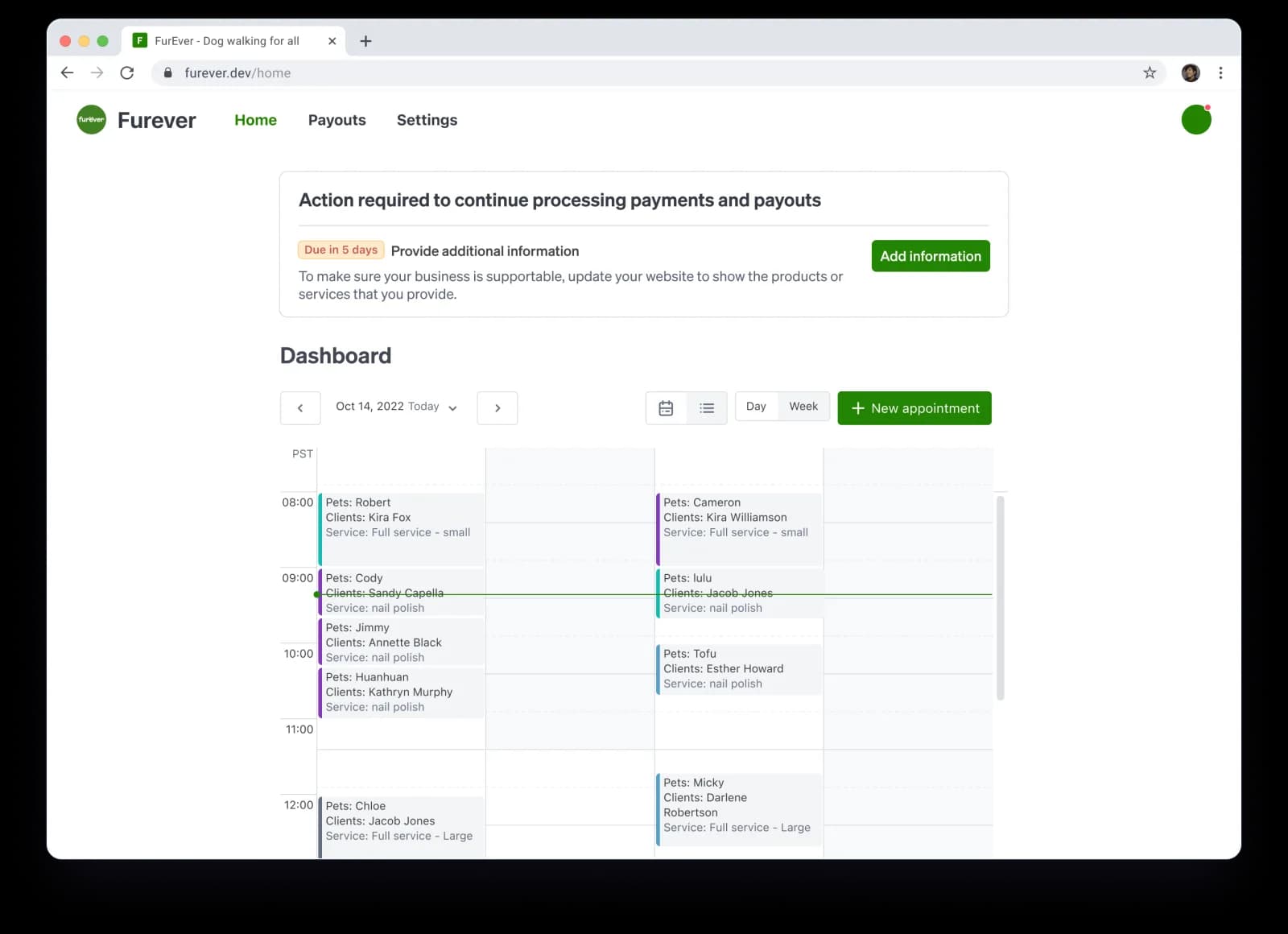
Stripe shows a banner at the top of your Dashboard when it needs something (source). The banner tells you what is missing and when it is due. It also sends an email, so check the inbox of the account owner.
Step 2: Open Account status
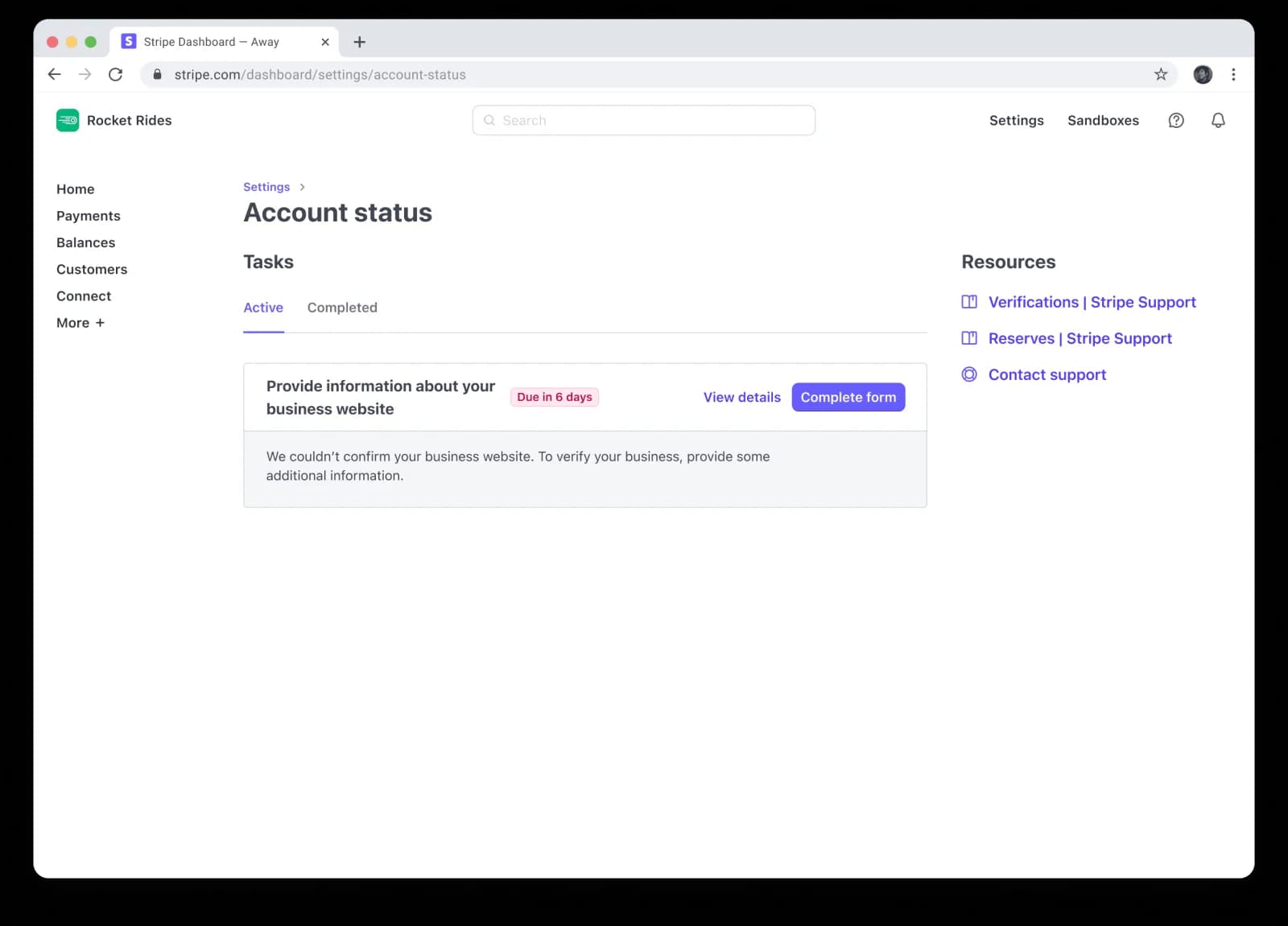
Go to Settings > Business > Account status (dashboard.stripe.com/account/status). Every open task is listed there with its deadline. Click View details to see why Stripe is asking, then Complete form to answer it.
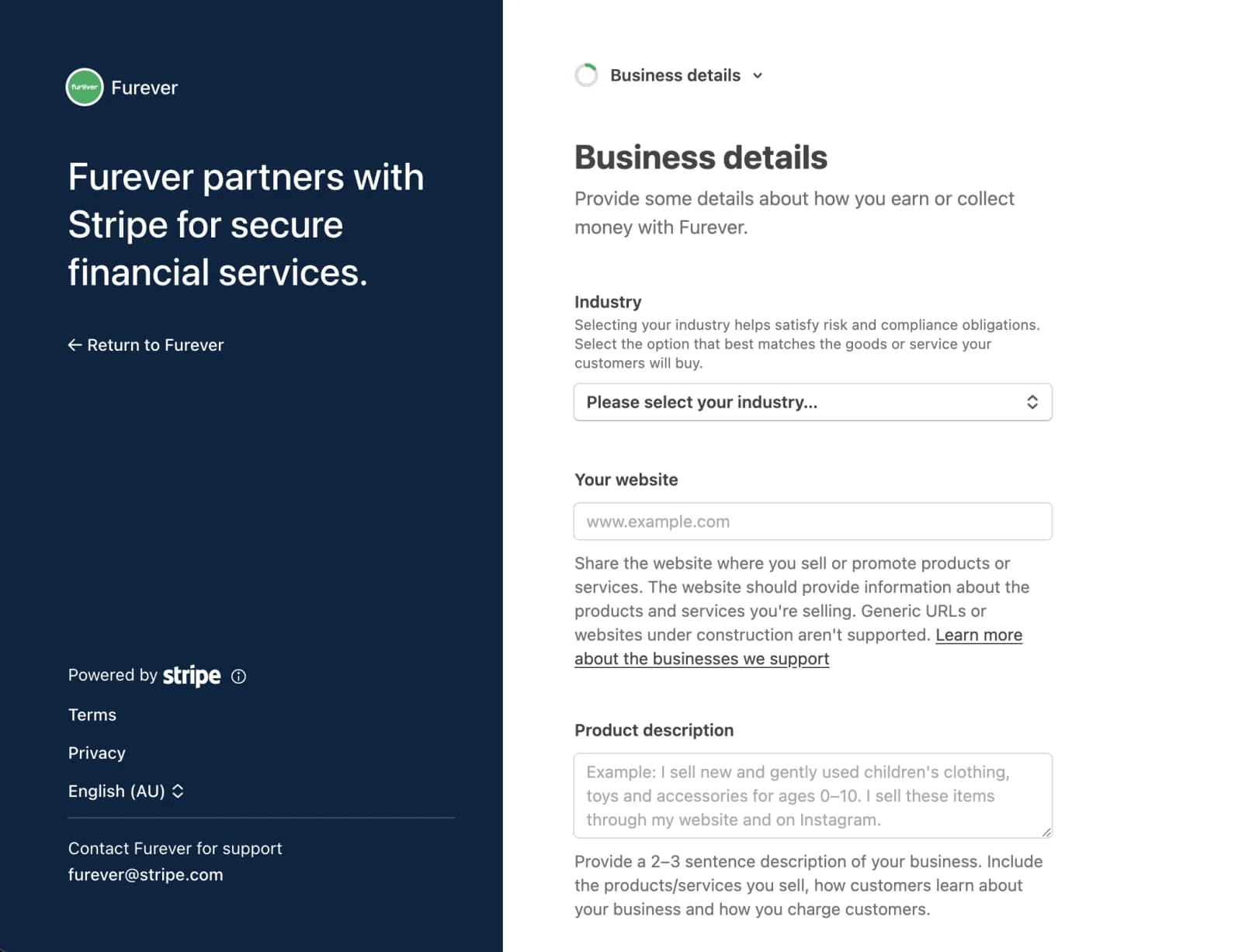
Step 3: Complete your business details
Pick the industry that matches what customers actually buy, add a live website, and write a 2 to 3 sentence product description. Stripe’s form says it outright: "Generic URLs or websites under construction aren’t supported."
Step 4: Verify the account representative
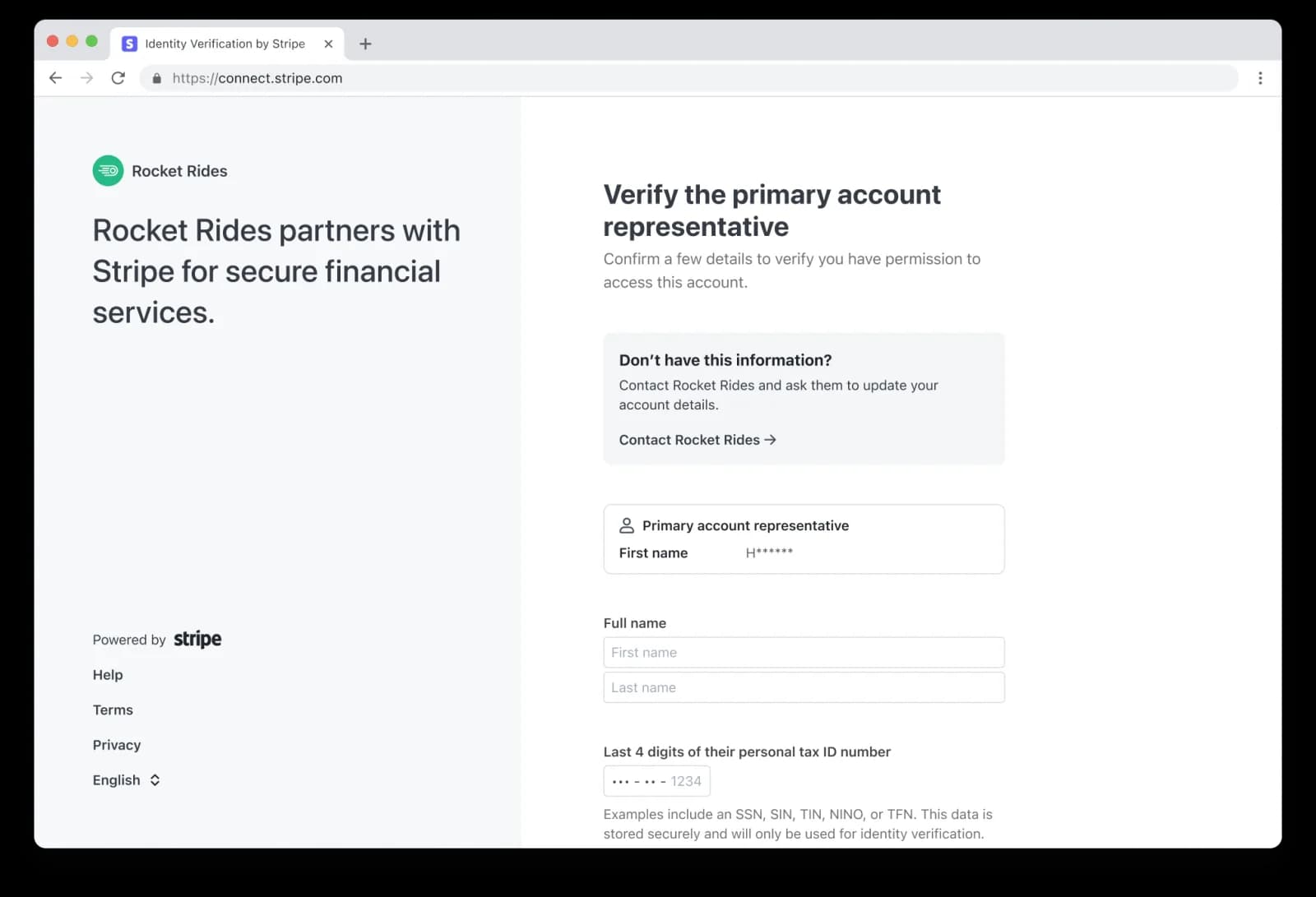
Enter the representative’s legal name exactly as it appears on their ID, and the last 4 digits of their personal tax ID. For a US person that is the SSN or ITIN. If the details don’t match, Stripe asks for a photo ID instead.
Step 5: Add owners, then the payout bank
List everyone with 25% or more, then link a business checking account. Both are covered in detail further down this guide.
Step 6: Review the summary and submit
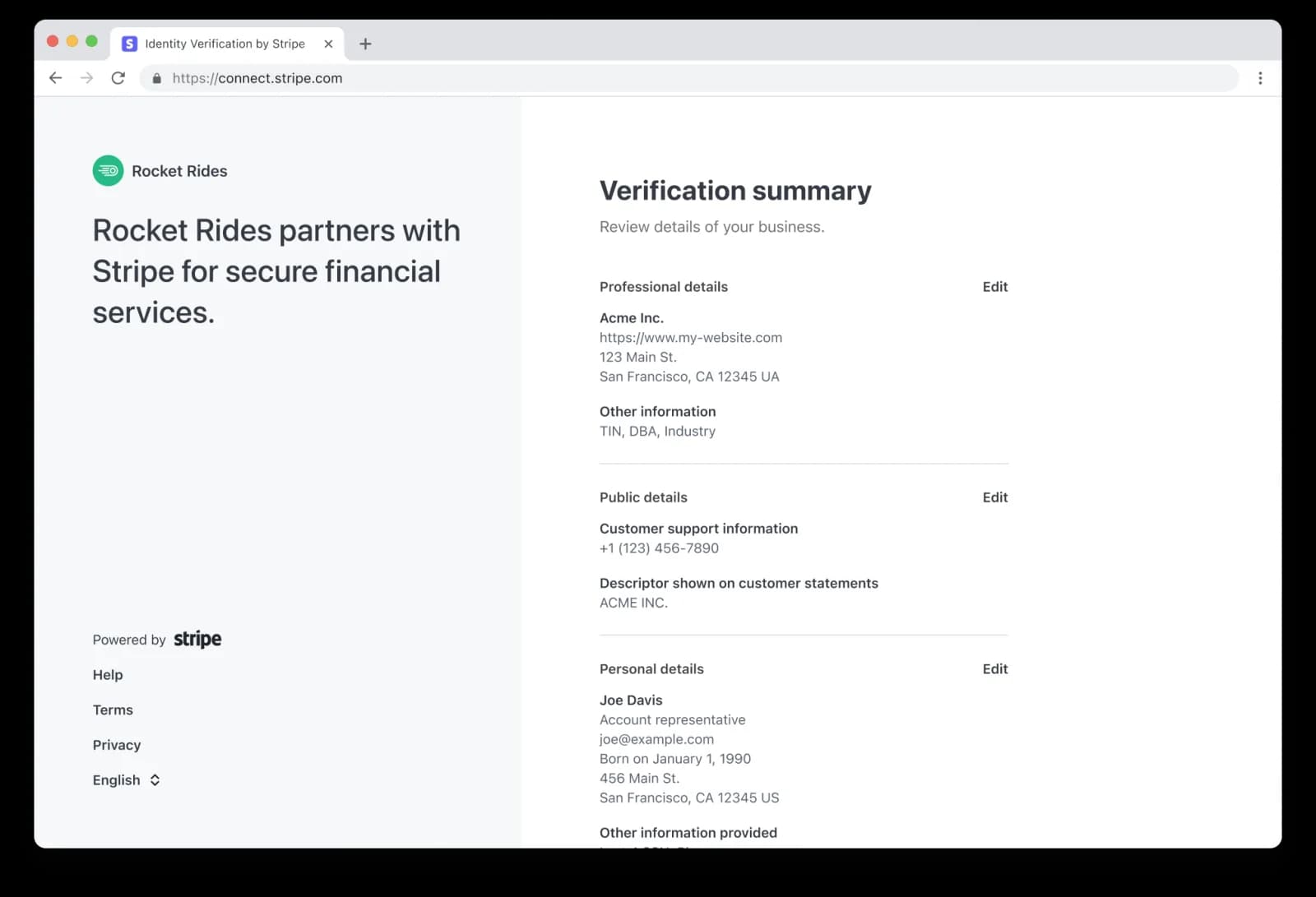
The summary splits your answers into professional details (legal name, website, business address), public details (what customers see) and personal details. Check every line against your IRS letter and your ID before you submit.
How long does Stripe verification take?
Data checks usually finish in minutes. A document review can take "anywhere from a few minutes to a few business days", depending on how readable it is (source), and ID or home-address reviews "can take up to 24 hours" (source). Stripe publishes no timeline for risk reviews. Whatever happens, your first payout waits 7 to 14 days, which Stripe says "cannot be waived under any circumstances" (source).
Stripe identity verification: ID, selfie and SSN
Stripe identity verification confirms that the representative and the owners are real people who are who they say they are. For most US founders it happens silently: Stripe matches name, date of birth, address and the last 4 of the SSN against its data sources. You only upload an ID if that match fails.
Why does Stripe need my SSN?
Because US rules require it. Stripe says that "even when using an EIN to verify a business, you are still required to provide the SSN for the individuals associated with every US Stripe account" (source). At signup a US representative gives the last 4 digits. The full 9 digits only come up at $500,000 in lifetime volume, and only if Stripe can’t match them automatically (source).
Is it safe to give Stripe your SSN? Stripe is a regulated payments company and states how it uses identity data in its privacy policy. That policy also says Stripe may get data from credit bureaus and "conduct credit checks where lawfully permitted", so don’t assume there is never a credit inquiry.
When Stripe asks for an ID and a selfie
If the automatic match fails, or a risk review asks for it, Stripe requests a government photo ID, sometimes with a selfie. The selfie is matched to the ID photo. Stripe keeps the biometric data for 1 year and the images for up to 7 years, and you can decline use of your images for model training (source).
- Use an ID that is not expired and shows the same name you typed.
- Photograph it in color on a plain surface, all 4 corners visible, no glare over the photo or the numbers.
- Take a new photo. Screenshots and scans of photocopies are rejected.
- If you live outside the US, use your passport. It is the only ID Stripe accepts for a person living outside the account’s country (source).
Stripe identity verification not working?
- Name mismatch: the ID shows a middle name or a different spelling. Make the typed name match the ID, then upload again.
- Blurry or cropped photo: retake it in daylight with the whole card in frame.
- Black-and-white photo ID: photo IDs must be in color.
- Wrong file: a PDF where Stripe wants a JPG or PNG for IDs.
- Same file resubmitted: duplicates fail automatically. Take a fresh photo.
Stripe Business Verification
Unlock the Full Guide & Checklist
Enter your business email to read the rest of this breakdown, download the PDF edition, and receive official compliance updates.
Stripe EIN and tax ID verification: the exact-match rule
The most common Stripe verification failure is a tax ID mismatch. Stripe checks your legal name and EIN against IRS records, and "any minor difference in the business name – including spaces, hyphens, accents, apostrophes, etc – will result in an error" (source).
Copy the name from your IRS letter, not from memory
- Open your CP 575 (the letter the IRS mails when it assigns your EIN) or your Letter 147C.
- Type the legal name exactly as printed there: same punctuation, same "LLC" or "Inc.", same spacing.
- Put your brand name in the DBA or public details fields, never in the legal name field.
- If you changed the company name with the IRS, use the new name only after the IRS has processed it.
The single-member LLC trap
A single-member LLC owned by one person is a disregarded entity for US tax. Stripe’s guidance for that case is to use "the owner’s individual name and SSN or EIN. The LLC’s name or EIN should not be used" (source). Many founders fail here by entering the LLC’s EIN. Check how your latest Form W-9 is filled in and match Stripe to it.
Which IRS documents Stripe accepts
| Document | Accepted? | How to get it |
|---|---|---|
| CP 575 (EIN assignment notice) | Yes | Mailed once by the IRS when the EIN is issued. Online applicants can also download a digital CP 575 from their IRS Business Tax Account (source). |
| Letter 147C (EIN previously assigned) | Yes. The address on it doesn’t need to match. | Call the IRS Business & Specialty Tax Line, 800-829-4933, Monday to Friday 7 a.m. to 7 p.m. local time (source). |
| SS-4 confirmation letter | Yes | The IRS confirmation you get after the SS-4 is processed. |
| IRS fax transmission letter / EIN Assistance Letter | Yes | Issued when the IRS assigns an EIN by fax or through assistance. |
| Your filed Form SS-4 application | No | An application is not proof the IRS assigned the number. |
New EIN? Wait before you retry
The IRS says to "wait up to 2 weeks" before a new EIN passes TIN matching (source). For a new or updated business name, Stripe says "on average, this takes the IRS 3–4 weeks" (source). Stripe treats a tax ID issued in roughly the last 3 months as new. In that window, upload your SS-4 confirmation letter or CP 575 in the Dashboard instead of re-typing the number again and again.
Stripe business address and proof of address rules
Stripe’s rule for US accounts is short: "All businesses must provide the address of the physical location where the majority of your business activity is carried out (PO Boxes are not accepted)" (source). When you update it, Stripe adds that "PO Boxes, HCs, and Private Mailboxes will not be accepted" (source).
Three addresses, three different jobs
| Address | What it is | Rules |
|---|---|---|
| Business (legal) address | Where most of the business activity happens. | US physical address. No PO box, PMB or highway contract box. |
| Representative’s home address | Where the representative lives. | Their real residential address, in any country. No PO box. |
| Public support address | What customers see on receipts and statements. | Set under Settings > Business > Business details > Public details. Required on receipts (source). |
Can I use a PO box, virtual address or registered agent address?
- PO box: no. Stripe rejects it on the business address and on the representative’s address.
- Private mailbox (PMB) or virtual mailbox: no, not as the business address. Stripe lists private mailboxes among the addresses it won’t accept.
- Registered agent address: avoid it. Stripe Atlas itself says the registered agent address "shouldn’t be listed as a company address" (source). For Issuing, Treasury, Opal and Corporate Card, Stripe has screened out registered agent, mailbox and virtual addresses since July 1, 2025, "against a proprietary list" (source).
- Your home: yes, if you really run the business from there. It is a physical address where the work happens.
The registered-agent and mailbox screen is documented only for those 4 products, not for ordinary payment accounts. Still, the plain PMB rule on the address field applies to everyone, so plan on a physical address from the start.
Does Stripe show your address to customers?
Only the public support address. Stripe requires a legal business name, a customer support address, a support email and a privacy policy URL on receipts (source). Your legal business address and your home address stay with Stripe. If you work from home and want privacy, set a separate support address in Public details. Stripe documents no PO-box ban for that field, but it doesn’t explicitly allow one either.
Stripe proof of address: what to upload
If Stripe can’t confirm your business address, it asks for a document showing the business name (or the owner’s name) at that address (source):
- A signed lease or rental agreement
- A utility bill: water, electricity, gas or internet
- A federal or state tax return
- Articles of incorporation or another government business document
Date matters. Stripe’s standard is that an address document must be issued "within the last six months" (source). An old lease cover page or a year-old bill will bounce.
Stripe for non-US founders: supported countries and US LLCs
Stripe supports businesses in a fixed list of countries (see stripe.com/global for the current Stripe supported countries). If your home country isn’t on it, the usual route is a US company: an LLC or C-corporation formed in a US state.
Can a non-US citizen open a US Stripe account?
Yes, through a registered US company. Stripe’s rule is that "registered businesses must be registered in the US, even if you operate in another country". The requirement for a US-based owner or representative applies to unregistered businesses (source). That is why a non-US person can’t sign up as a sole proprietor: Stripe says the representative of an individual or sole-prop account "must be a US individual" (source).
What a non-US representative provides
- A passport, uploaded at onboarding. Stripe collects "a National ID or verification document" from non-US-resident representatives (source), and a passport is the only ID it accepts from someone living outside the US.
- Your home-country tax ID. A person without an SSN or ITIN provides "your local non-US tax ID and respective documentation to confirm you aren’t a US taxpayer" (source).
- Your real home address abroad. It doesn’t have to be in the US.
- The company’s EIN and its US business address, as for any US company.
Stripe Atlas: the built-in route
Stripe Atlas forms a Delaware LLC or C-corporation for $500, including the first year of registered agent service, then $100 a year (source). Atlas lets you accept US card payments before your EIN arrives, with up to $100,000 in payouts before the EIN (source). Without an SSN, Atlas says the EIN takes 10 to 45 business days. Atlas also says it "can’t guarantee that your business will be approved to use Stripe payments", so the verification steps in this guide still apply.
Payout bank for a non-US founder
US payouts in USD go to an account with a US routing number and account number (source). Plan on a US business checking account in the company’s name. Our Mercury address guide and EIN guide for non-US founders cover the steps before Stripe.
One thing you can skip: the FinCEN BOI report. Under FinCEN’s final rule, effective August 14, 2026, "U.S. companies are exempt from BOI reporting requirements" (source). That exemption doesn’t change Stripe’s own 25% owner check, which still applies.
Stripe bank account verification and your first payout
To add a payout account, go to Settings > Business > Bank accounts and currencies and use a checking account. Only an Admin or the Owner can add one, and the account number, routing number and holder name must match your bank statement (source).
Two ways to verify a bank account
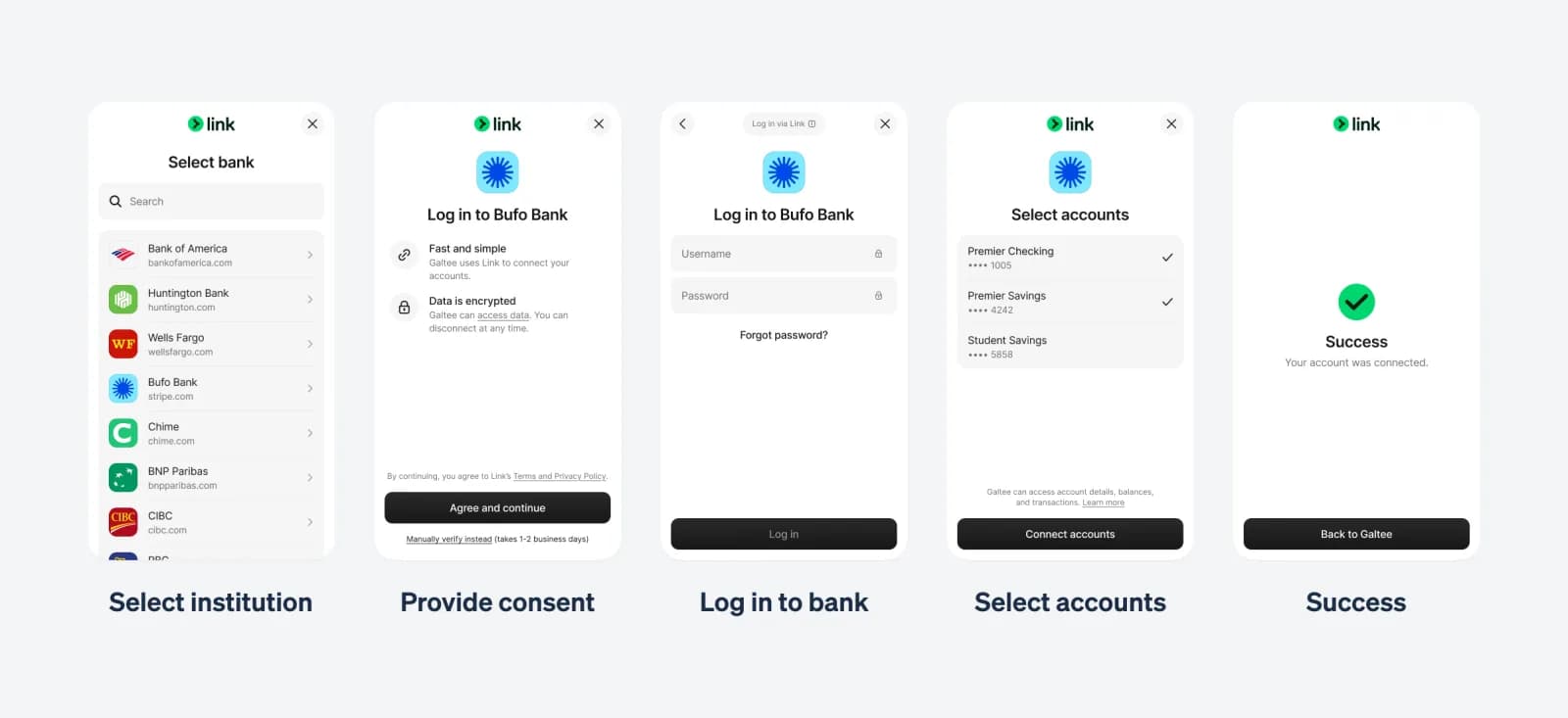
- Instant: log in to your bank through Stripe’s Financial Connections. The account is confirmed on the spot.
- Micro-deposits: enter the numbers by hand. Stripe sends a small deposit that "can take 1-2 business days to appear", with a 6-character code starting with SM that you type back into Stripe (source).
If Stripe asks you to prove you own the account
Upload a bank statement from the last year, a voided check or a letter on bank letterhead, showing the account holder name and account number. For an LLC, the holder name must be the company’s legal name or its DBA (source). A personal account under your own name won’t pass for a company account.
How long Stripe takes to pay out
The first payout waits 7 to 14 days after your first successful payment, and up to 30 days in some industries or countries (source). After that, the standard US schedule is 2 business days (source). A pending verification task doesn’t change that timer, but a past-due one pauses payouts entirely.
Stripe website requirements and business details
Stripe reviews your website to confirm you sell what you said you sell. It needs "a valid, publicly accessible business website" whose content matches your business name and product description (source). When it can’t confirm the site, you get a task like the one below.
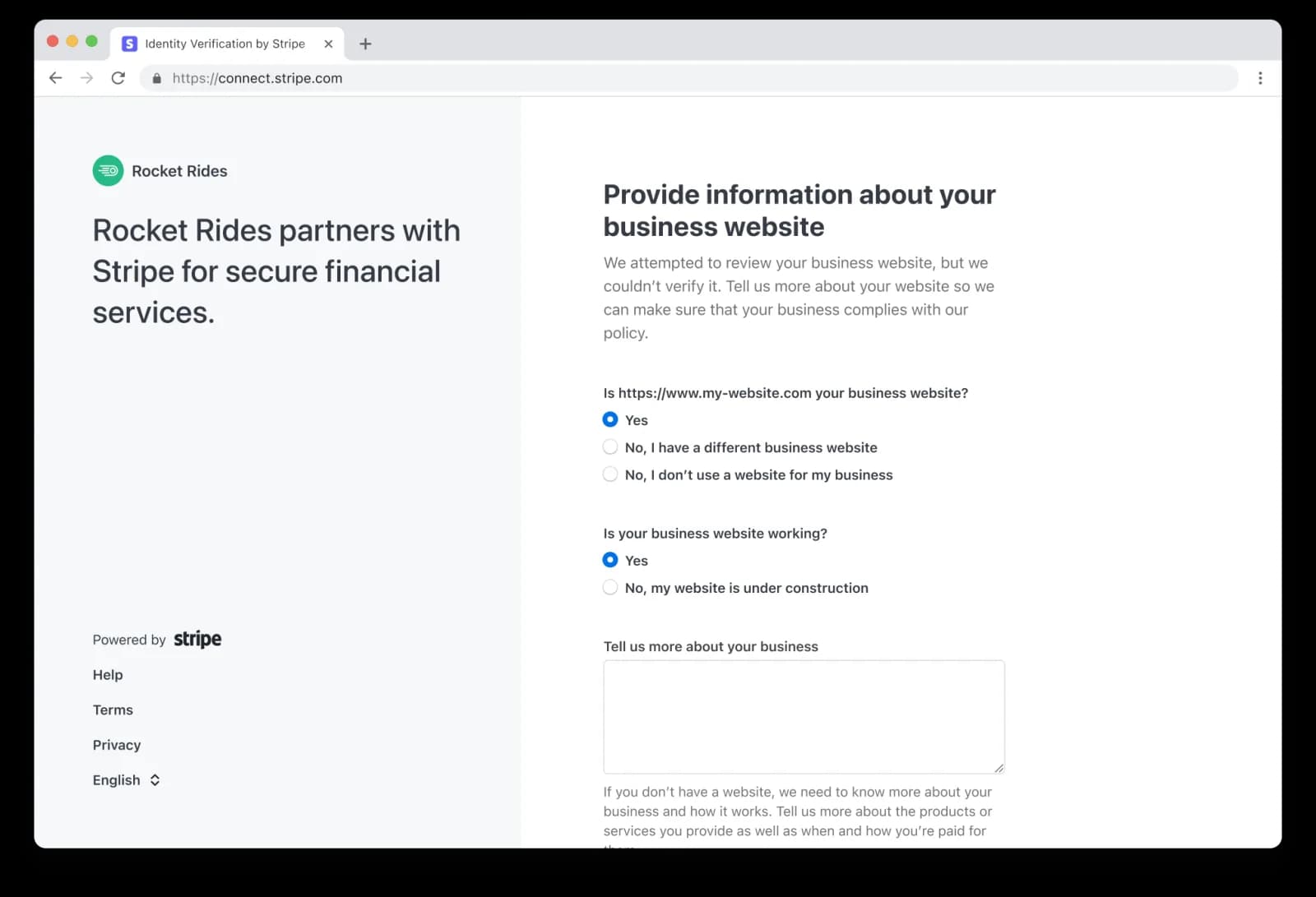
What your website needs before you apply
No website yet? Stripe accepts a product description instead. Say what you sell, how customers find you and how you charge them.
Statement descriptor
The statement descriptor is what appears on your customers’ card statements. It must be 5 to 22 Latin characters with at least one letter, can’t contain < > \ ' " or *, and should reflect your business or DBA name (source). A descriptor customers don’t recognize turns into disputes, and disputes turn into reviews.
Restricted and prohibited businesses
Check Stripe’s restricted businesses list before you sign up. Prohibited businesses can’t use Stripe at all. Restricted ones need Stripe’s prior approval and can still be declined. Picking a vaguer industry to get past onboarding tends to end in a closed account later.
Stripe account restricted or under review: the fix playbook
Most restrictions follow one pattern: Stripe asks for something, the deadline passes, and a capability is switched off. Stripe says it "typically disables payouts on the account if we don’t receive the information by the current deadline" and, if the account stays unresponsive, "might also disable the ability to process charges" (source).
What each status means
| Status you see | What it means | What to do |
|---|---|---|
| Due soon / currently due | Stripe needs this by the date shown. | Complete it now in Account status. |
| Eventually due | Needed later, once you pass a volume or time threshold. | Prepare the document now so it doesn’t catch you out. |
| Past due | The deadline passed. Payouts, and later charges, are paused. | Submit immediately. Payouts resume once the item is accepted. |
| Pending verification | Stripe is reviewing what you sent. | Wait. Don’t upload the same file again. |
| Under review | A risk or compliance review of the business. | Answer every request fully; add invoices or supplier proof if asked. |
| Rejected | Stripe closed or declined the account. | Use the appeal form linked in Stripe’s email. |
The most common errors and their fixes
- Tax ID doesn’t match IRS records: re-type the legal name exactly as on your CP 575 or 147C, or upload the letter. Single-member LLC owners: try your own name and SSN (source).
- Identity couldn’t be verified: check the name and date of birth, then upload a color photo ID.
- Address can’t be a PO box or private mailbox: replace it with the physical address where you work, then upload proof dated in the last 6 months.
- Website couldn’t be verified: publish policies, pricing and contact details, then answer the website task.
- Missing owners: add everyone with 25% or more and confirm the owner list.
Why is Stripe holding my money?
A hold is usually either a past-due verification task or a reserve. A reserve is "a temporary hold on a portion of a business’s funds", either fixed or rolling. If it can be appealed, the option appears on your Balances page, and Stripe re-reviews a few days before the reserve ends (source). During a review Stripe may ask for itemized invoices, prior processor statements, product photos or supplier proof (source). Can’t provide what it asks for? Contact support: Stripe says it "will work with you to try and find alternative solutions".
If Stripe closed your account
Stripe sends an email and shows a red banner. The appeal route is the form linked in that email (source). Our guide Why Stripe closed my account goes through the appeal in detail.
Stripe verification checklist before you submit
Run through this list once before you activate your account, and again whenever Stripe opens a task.
Frequently asked questions
What is Stripe verification?
Stripe verification is Stripe’s Know Your Customer (KYC) check. Stripe confirms the identity of the account representative and owners, the business’s legal name and tax ID, its physical address and its payout bank account, as its regulators require.
How long does Stripe verification take?
Automatic checks usually finish in minutes. A document review takes from a few minutes to a few business days, and ID or home-address reviews can take up to 24 hours. Your first payout still waits 7 to 14 days after your first payment.
How do I verify my Stripe account?
Open Settings > Business > Account status in the Stripe Dashboard, complete each task before its due date, and upload any requested documents there. Stripe doesn’t accept documents by email.
What documents does Stripe require?
Usually none, if your typed details match. When a check fails, Stripe asks for a photo ID for people, a CP 575 or Letter 147C for the EIN, a lease, utility bill or tax document for the business address, and a bank statement or voided check for the payout account.
Why does Stripe need my SSN?
US rules require Stripe to verify the individuals behind every US account, even when the business has an EIN. A US representative gives the last 4 digits at signup. A non-US representative gives a passport and their home-country tax ID instead.
Can I use Stripe without an EIN?
A US sole proprietor can use their SSN. An LLC or corporation needs an EIN. Stripe Atlas companies can take card payments before the EIN arrives, with up to $100,000 in payouts until it does.
Can I use a PO box or virtual address for Stripe?
Not as the business address. Stripe requires the physical location where most of the business activity happens and rejects PO boxes, private mailboxes and highway contract boxes on that field. A mailbox can still receive your mail; it just can’t be the address Stripe verifies.
Can I use my registered agent address for Stripe?
You shouldn’t. Stripe Atlas says the registered agent address shouldn’t be listed as a company address, and Stripe screens out registered agent addresses for Issuing, Treasury, Opal and Corporate Card. Use the address where you actually work.
Does Stripe show my address to customers?
Only the customer support address you set in Public details. It appears on receipts. Your legal business address and your home address are not shown to customers.
Can a non-US citizen open a Stripe account?
Yes, through a company registered in the US or in another Stripe-supported country. A non-US person can’t open a US account as a sole proprietor, because Stripe requires a US individual as the representative for those accounts.
Why is my Stripe account restricted?
Usually because a verification task passed its deadline. Stripe pauses payouts first, then charges if the account stays unresponsive. Complete the open tasks in Account status and payouts resume once Stripe accepts them.
How long does Stripe hold funds?
It depends on the reason. A past-due task holds payouts until you complete it. A reserve holds part of your balance for the period Stripe sets, and Stripe re-reviews a few days before it ends. Appealable reserves show an appeal option on the Balances page.
Is Stripe verification legit?
A real request appears in your Stripe Dashboard under Settings > Business > Account status. Stripe only accepts documents uploaded there. If an email or text asks you to send documents anywhere else, sign in to the Dashboard directly and check before you do anything.
What is a Stripe verification code?
A text message code, usually from Link, Stripe’s saved-checkout service, sent when someone enters your phone number at checkout. It isn’t part of verifying your business account.